
Have someone visit your website, browse around, add something to their cart, and then leave? It happens all the time. Life gets in the way, distractions pop up, or maybe they just weren’t ready to buy at that exact moment. But what if you could gently remind them about what they almost bought, or even what they simply looked at? That’s exactly what Google Ads Retargeting (also called remarketing) is all about.
Think of it like this: someone walks into your physical store, looks at a few items, and leaves without buying. With retargeting, it’s like you can then show them a little billboard with those exact items on their way home, just to remind them. Pretty neat, right?

Get Found, Get Chosen, Get Your Time Back
A free one-day marketing seminar in Milton Keynes · 10 November 2026
How Does This Magic Work?
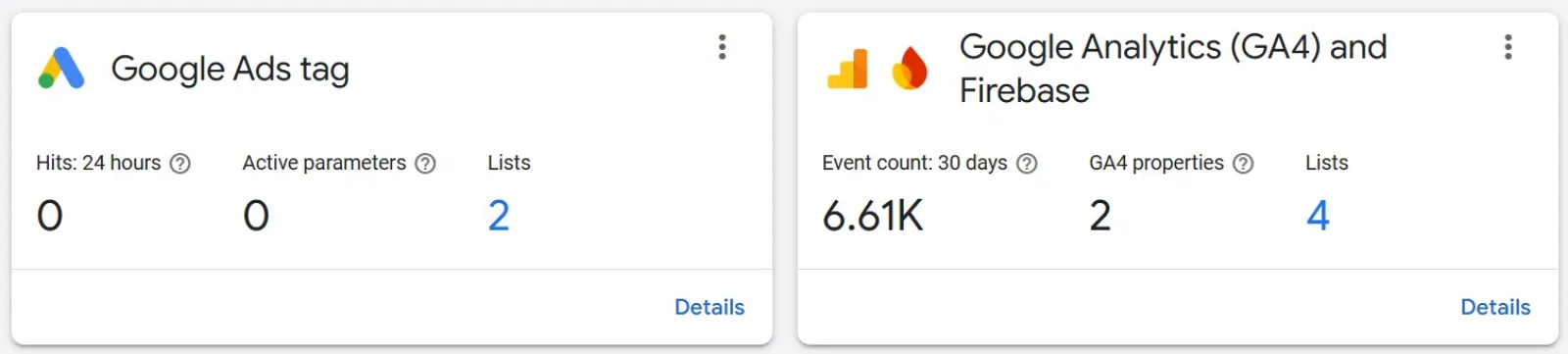
It’s not magic, it’s clever technology! When someone visits your website, a tiny piece of code (often called a “pixel” or “tag”) from Google Ads quietly adds them to a special list. This list is super important because it’s how Google knows who to show your ads to later.
Get your free Marketing Action PlanNot sure where to start? Answer a few questions and get your plan in about a minute. No email needed.
 LIVE
Live every Tuesday at 2pm UK. Bring your marketing questions.
Get your Google, local SEO and AI questions answered live.
Then, as these people go about their business online – browsing other websites, watching YouTube videos, or checking their Gmail – Google’s ad network can show them your targeted ads. It’s like a friendly nudge, reminding them of your brand and what they were interested in.
Why Bother with Retargeting?
You might be thinking, “Why spend money on people who have already left?” Here’s why it’s a smart move:
- They already know you (a little): These aren’t strangers. They’ve already shown some interest by visiting your site. This makes them much “warmer” leads than someone who has never heard of you.
- Higher chances of converting: Because they’re already familiar with your brand, they’re more likely to convert (buy something, fill out a form, etc.) when they see your ads again.
- Cost-effective: Targeting people who are already interested can often be more efficient than trying to find brand-new customers from scratch. You’re focusing your budget on a more receptive audience.
- Boosts brand recall: Even if they don’t click immediately, seeing your ads regularly keeps your brand top-of-mind.
Simple Steps to Get Started with Google Ads Retargeting
Ready to bring those lost customers back? Here’s a simplified look at how to set up your first Google Ads retargeting campaign:
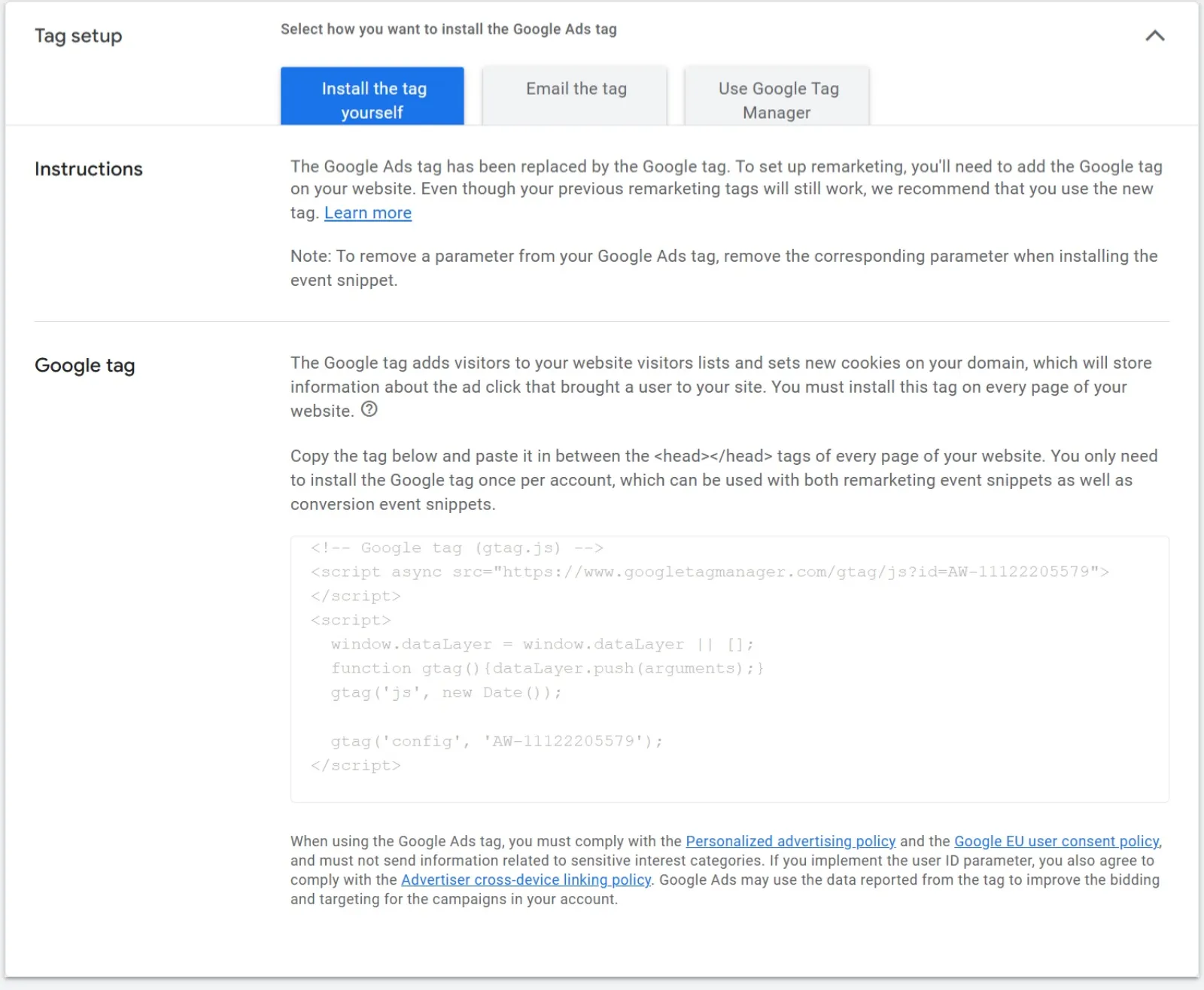
- Set up your Google Ads Tag: This is the crucial first step. You’ll need to get a special code snippet from your Google Ads account and add it to every page of your website. Don’t worry, it’s usually a copy-paste job, and if you use a platform like WordPress, there are plugins to help. This tag is what builds your audience lists.
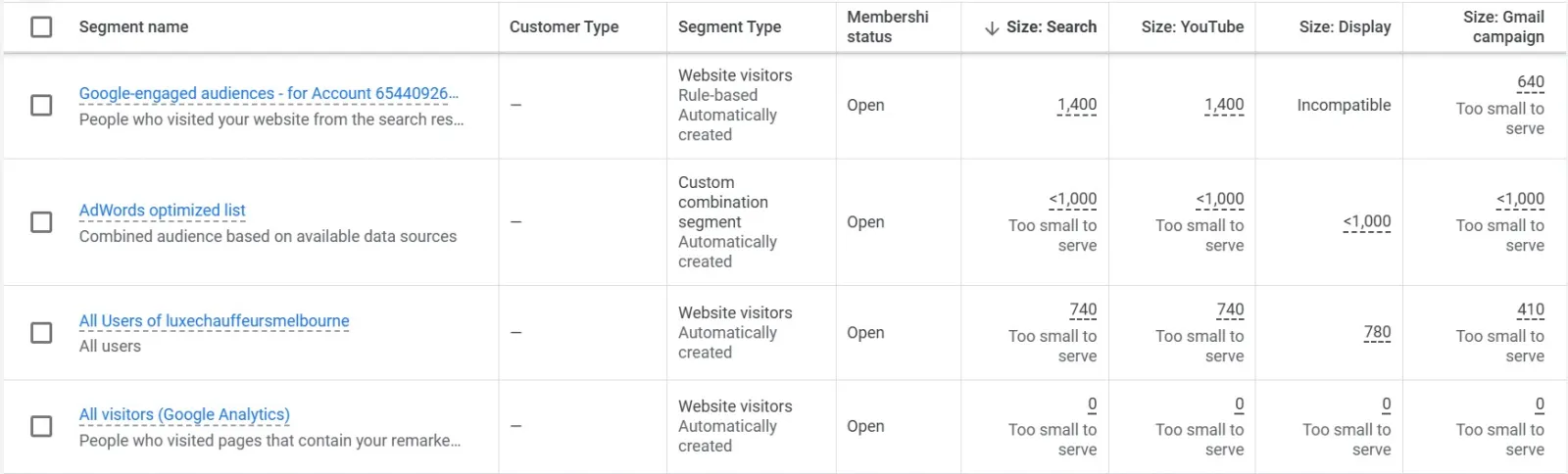
- Create your Audience Lists: Once the tag is active, Google starts collecting data. You can then create different “audience lists” based on how people interacted with your site. For example:
- All website visitors: Anyone who visited any page on your site.
- Cart abandoners: People who added items to their shopping cart but didn’t complete the purchase. (This is a golden one!)
- Specific page visitors: People who visited a particular product page or service page.
- Past purchasers: Believe it or not, you can retarget people who have bought from you to encourage repeat business or cross-sell.
- Build Your Campaign: Now that you have your audience lists, you can create a new campaign in Google Ads. When you choose your campaign type, select “Display” for visual ads that show on other websites, or even “Search” for ads that show up when they search on Google after visiting your site.
- Design Your Ads: Create compelling ads that remind your audience about what they saw. For cart abandoners, you might show the exact products they left behind. For general website visitors, a strong brand message or a special offer can work wonders.
- Set Your Budget and Bids: Decide how much you want to spend and how you want Google to bid for your ads. Starting with a reasonable daily budget and an automated bidding strategy (like “Maximise Conversions”) can be a good way to begin.
- Launch and Monitor: Once everything is set, launch your campaign! But don’t just set it and forget it. Keep an eye on how your ads are performing. Are people clicking? Are they converting? You’ll want to make adjustments as you go.
A Few Handy Tips:
- Segment your audiences: Don’t just lump everyone into one big list. The more specific your audience lists, the more targeted and effective your ads can be.
- Frequency capping: You don’t want to annoy people by showing them your ads too many times. Google Ads allows you to set a “frequency cap” to control how often an individual sees your ad.
- Offer value: Give people a reason to come back. This could be a discount code, free shipping, or a reminder of a key benefit.
- Test, test, test: Try different ad creatives, headlines, and offers to see what works best for each audience segment.
Google Ads retargeting is a powerful tool to recapture interest and convert those almost-customers into actual customers. It’s about being there with a gentle reminder at the right moment, turning lost opportunities into valuable conversions.

Written by Uzair Kharawala
Partner at SF Digital Studios, a Google Premier Partner agency. Uzair has been helping businesses grow with Google Ads since 2002 and teaches it every week on YouTube.
Get our best Google Ads tips by email
New articles and videos, straight to your inbox. Unsubscribe any time.