
You serve ten towns. So someone told you to build ten pages, one for each town. You wrote one, copied it nine times and swapped the name.
Six months later, none of them ranks. Not one. A couple are not even indexed.

Get Found, Get Chosen, Get Your Time Back
A free one-day marketing seminar in Milton Keynes · 13 January 2027
This guide shows you how to build location pages that Google treats as real pages, not copies. It covers what Google's rules actually say and what goes on each page.
Get your free Marketing Action PlanNot sure where to start? Answer a few questions and get your plan in about a minute. No email needed.
Get my plan →It also covers how many to build and how to fix the ones you already have.
A quick note first. SF Digital builds websites and runs SEO for local businesses. So we are not neutral on this. We have kept to Google's own published rules and labelled our own views clearly.
How Do You Build Location Pages Google Won't Treat As Copies?
Give each page facts that only fit that town. Show real jobs you did there, reviews from customers who live there, local details like travel times and prices, and answers to that town's questions. If you can swap the town name and the page still reads true, it is a copy.
That is the whole test. The rest of this guide is how to pass it without spending every evening writing.
A real town page is useful to someone in that town, even if Google didn't exist. That is the standard to aim for.
What Is A Location Page, And Who Needs One?
A location page is a page on your website about your service in one particular place. You'll also hear them called town pages, area pages or service area pages.
There are two kinds. They work differently.
The first is a branch page, where you have a real address in that town with staff, opening hours and a door customers can actually walk through. A dental practice with three surgeries needs three branch pages.
The second is a service area page. You are based in one place but travel to customers in nearby towns. A roofer, a plumber, a dog groomer with a van or a cleaning company all fit here.
Branch pages are simple to make unique, because each branch is different. Service area pages are where most businesses go wrong.
The work is the same in every town. So the pages come out the same too.
This guide focuses on service area pages, since that's where the copy-and-paste problem lives. The same rules apply to branch pages.
What Does Google Actually Say About Town Pages?
Google does not ban location pages. That surprises people. It bans pages made only to catch searches for different places, which it calls doorway abuse.
As of November 2026, Google's spam policies page lists doorway abuse examples. One of them is "having multiple domain names or pages targeted at specific regions or cities that funnel users to one page".
Another is "creating substantially similar pages that are closer to search results than a clearly defined, browseable hierarchy".
Ten pages that differ only by the town name fit that description closely, and it's the reason so many of them end up sitting in Search Console as crawled but not indexed, or nowhere in the results at all. They exist to rank, not to help.
The same policies page covers keyword stuffing. Among its examples are "blocks of text that list cities and regions that a web page is trying to rank for". So the long list of 40 towns in your footer is a risk too, not a shortcut.
There's a third rule worth knowing. Google's spam policies describe scaled content abuse as "many pages are generated for the primary purpose of manipulating search rankings and not helping users".
It says this applies "no matter how it's created", which includes AI tools.
Put simply, Google judges the page by whether it helps the person reading it. A page that helps someone in Dunstable is fine. A page that only exists to rank for "roofer Dunstable" isn't.
Why Do Location Pages Still Matter For A Small Business?
Because people search with a town name. All the time. They type "electrician Milton Keynes" or "dog groomer near Tring". Google wants to show a page that matches.
Your homepage cannot match every town, because it has to talk about your business as a whole, your services, your story and why people should pick you. A good town page answers the exact search someone made.
They also win you work you'd otherwise miss. Your Google Business Profile ranks best near your address.
For towns further out, you need something else. A strong page on your website is often your best chance there.
There is a quieter benefit too. A page with real local jobs and local reviews builds trust before anyone calls.
A customer in Aylesbury sees you've worked on their side of town. That changes how they read everything else.
AI tools are now part of this too. ChatGPT, Gemini and Google's AI answers quote pages that give specific, local facts. A copied page gives them nothing to quote.
The flip side is cost. Thin pages do not only fail to rank.
They can drag down how Google sees the rest of your site. They make it look built for search engines, not people.
Copy-And-Paste Town Page Versus A Real One
Here's the difference side by side. Most owners recognise their own pages in the left-hand column.
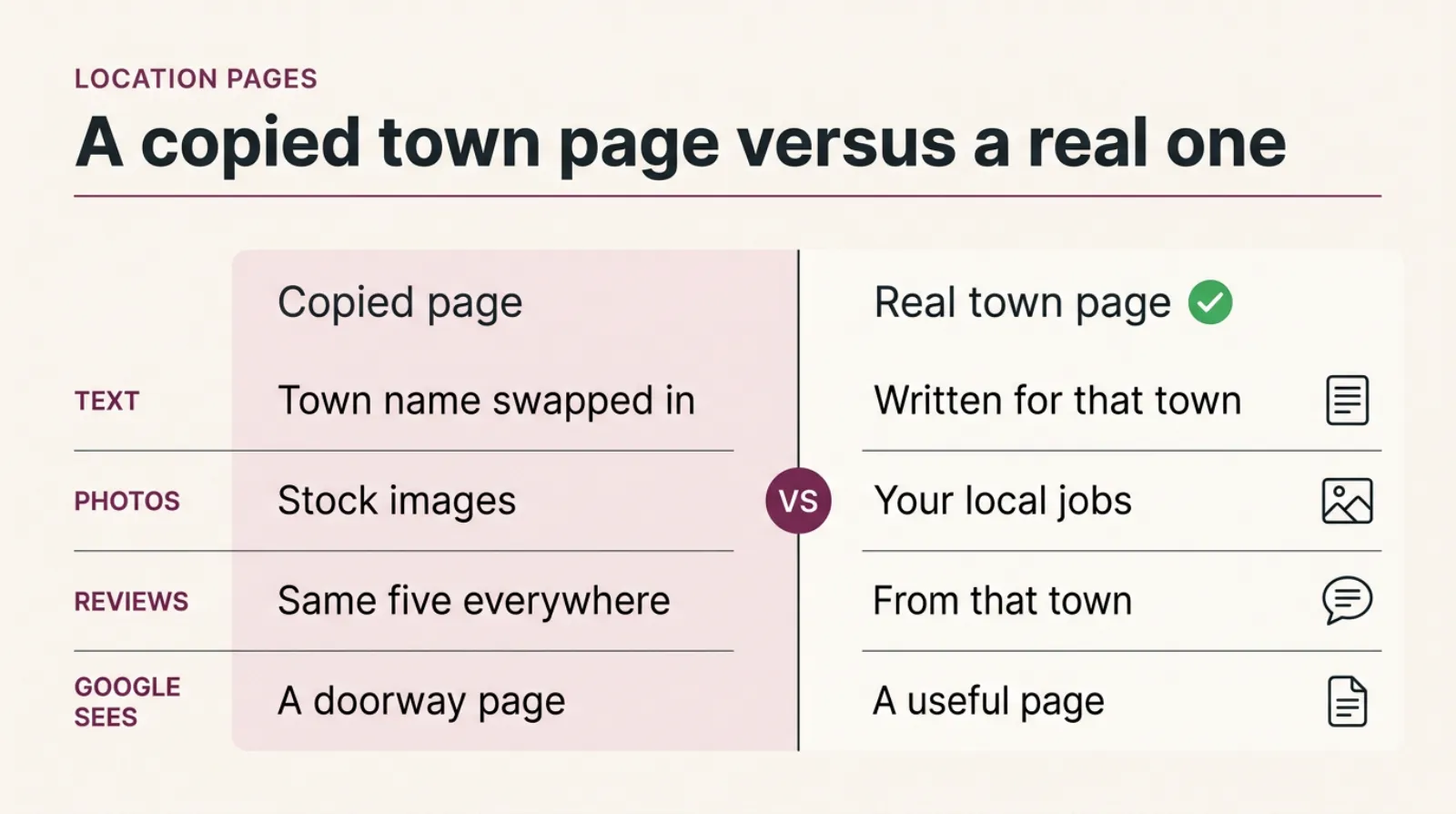
A comparison of a copy-and-paste town page and a real town page: the copied page swaps the town name into the same text, while the real page shows local jobs, local reviews, real travel times and answers to that town's questions.
| Copy-and-paste page | Real town page | |
|---|---|---|
| Main text | Same as every other town, name swapped | Written for that town, with local detail |
| Photos | Stock images or the same three photos | Photos of jobs done in that town |
| Reviews | Your general reviews, or none | Reviews from customers in that town |
| Practical detail | None | Travel time, call-out charge, parking, access |
| Questions answered | Generic FAQs | Questions people in that town actually ask |
| What Google sees | A doorway page | A useful page in a clear site structure |
You do not need every row on the right from day one. But each page needs enough of them that it couldn't belong to any other town.
What Should Go On A Location Page?
Eight things make a town page genuinely local. Most businesses already have the raw material. It's sitting in their phone, their job sheets and their reviews.
Real jobs you've done there
This is the strongest signal you have, because a competitor can copy your wording in an afternoon but can never copy the jobs you actually did in that town.
Write two or three short job write-ups. Each one needs a photo, the street or area, what the problem was and what you did.
"Replaced a leaking valley on a 1970s semi off Wing Road" says more than any paragraph about quality.
Photos from local jobs
Use your own photos, taken on the job. Stock images tell Google and the reader nothing.
A van outside a recognisable local street works. So does a finished kitchen or a before-and-after.
Reviews from that town
Pick the reviews where the customer mentions the town or the area. Put each one on the page it belongs to.
The same five reviews on every page is another copy.
Practical details
Say how long it takes you to get there and whether there's a call-out charge. Say which days you are usually in the area.
Mention where you park on the narrow streets of the old town. Only a real business could write that.
Local knowledge
What's different about the homes, gardens or businesses there? Older stone houses, new-build estates, conservation areas, hard water, flood risk.
Write about the things that change how you do the job. That's expertise a reader can see.
Prices, where you can give them
A line with your own figures, such as "most boiler services we do in Linslade cost between £80 and £95", is useful. Nobody else's page will say it.
Even a starting price helps. People want a rough idea before they pick up the phone.
That town's questions
Check your emails and calls. Do people in one town keep asking about parking permits, listed buildings or the flat roofs on one estate? Those are your questions.
Answer those questions on that page, in the words people use.
A named person
Name the team member who covers that area, with a photo. People like knowing who will turn up.
Put a clear way to get in touch at the top and the bottom too. A phone number that's tap-to-call on mobile matters more than a long form.
Here is an example of how this plays out. Picture a roofer based in Leighton Buzzard who covers Milton Keynes, Dunstable and Aylesbury. This is an illustration, not a client.
The Milton Keynes page talks about the flat roofs and garage roofs on the estates built since the new town began in 1967.
It shows three jobs in Bletchley and Wolverton, with reviews from those customers.
It says the van is in Milton Keynes most Tuesdays and Thursdays.
The Dunstable page is about older terraces and chimney work. It shows different jobs, different reviews and different questions. The two pages share a layout and a booking form, and nothing else.
The Building Blocks Of A Town Page Worth Ranking
Every strong town page is built from the same few kinds of local proof, arranged around one town.
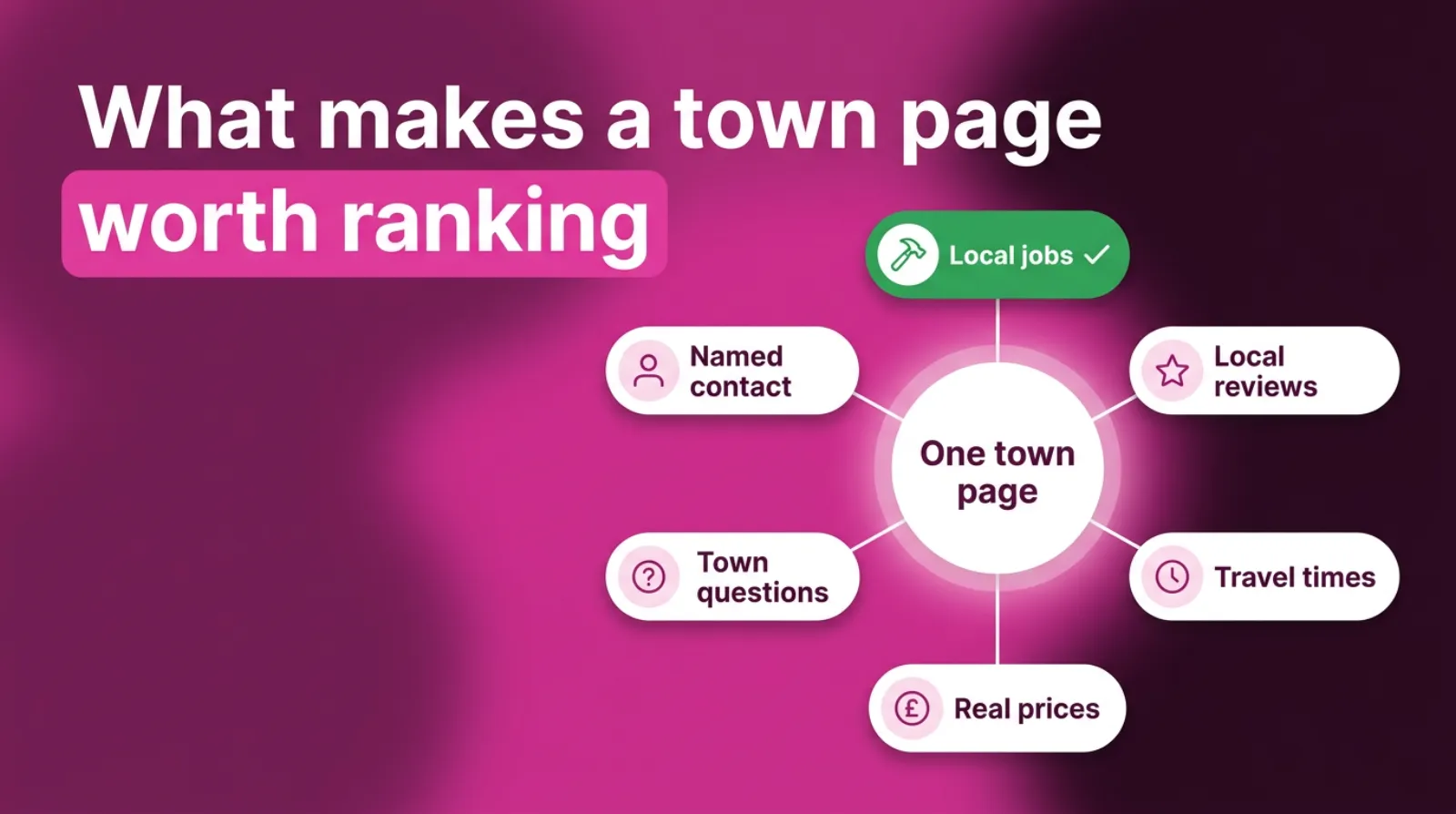
The layout and the booking form can stay the same on every page. The proof inside them has to change.
What Does A Good Location Page Look Like, Top To Bottom?
A good town page follows a simple order. Local proof comes first, shared information comes last. Here's the layout we'd use for a small service business.
- A heading with your service and the town, such as "Roof Repairs In Dunstable".
- Two or three opening lines that say who you are, that you work in that town and how quickly you can get there.
- A phone number and a short enquiry form.
- Recent jobs in that town, each with a photo and a few lines.
- Reviews from customers in that town.
- Practical details: travel time, call-out charge, usual days in the area, parking.
- Local questions and answers.
- Your service details, guarantees and accreditations, the part that can repeat.
- A link back to "Areas we cover" and across to your main service pages.
Keep the opening lines short. Someone on a phone should see the town name, the service and the phone number without scrolling.
Do not pad the page to hit a word count. A page of 400 words packed with real local detail beats 1,500 words of filler. Length helps only when every paragraph adds something.
Write the page title and description for each town too. These are what people see in Google.
"Roof Repairs In Dunstable | Same-Week Visits" works better than your business name followed by a list of towns.
How Much Of Each Location Page Has To Be Unique?
Google doesn't publish a percentage. You will see figures quoted online, often 30 or 60 percent unique text. But none of them comes from Google.
A better test is ours, and it's quick. Delete the town name from the page. Read what's left.
If it would be just as true for any other town, the page is a copy, whatever a percentage tool says.
Some things are fine to repeat. Your service description, your guarantee, your accreditations and your booking form can be the same on every page. People need that information wherever they live.
What cannot repeat is the reason the page exists. If the only local thing on the page is the town name in the heading, there isn't a reason.
A useful rule of thumb from our side is this. The top half of the page should be local.
 LIVE
Live every Tuesday at 2pm UK. Bring your marketing questions.
Get your Google, local SEO and AI questions answered live.
Shared material sits lower down, after the reader has seen proof you work in their town.
Rewording does not count. Swapping "fast" for "quick" on each page is exactly what Google's scraping and scaled content examples describe. Synonyms don't make a page unique.
Should You Make A Page For Every Town You Serve?
No. Make a page only for towns where you can show real local proof and where people actually search.
Start with the towns that bring you the most work, or the most profitable work. Look at your job list from the last year. Which five towns come up most? Those are your first pages.
Then check that people search for your service there. Type your service and the town into Google and see what comes up. If directories and big national firms fill the page, there is demand.
Small villages are usually better covered on a nearby town's page, where a sentence or two about them sits naturally alongside the jobs you've done in the bigger town next door.
A short line such as "we also cover Heath and Reach, Stanbridge and Eggington" is fine, as long as it's a sentence and not a long list.
Google's own Business Profile guidelines give a sense of scale. They say a service area "shouldn't extend farther than about two hours of driving time from where your business is based", with some exceptions.
If you are building pages for towns three hours away, ask whether you really serve them.
Fewer, better pages beat a page for every town. Five strong ones will usually do more than fifty thin ones.
How Many Location Pages Should A Small Business Have?
For most local service businesses, three to eight good location pages is plenty to start with. That's our working range, not a Google rule.
The right number is the number you can make genuinely different. If you can show real jobs, reviews and local details for six towns, build six.
If you only have proof for two, build two and add more as the jobs come in.
You can always add a page later. Start small. Removing fifty weak pages is much harder. It takes time for Google to notice the clean-up.
A single "Areas we cover" page sits above them all.
It lists the towns you serve in plain sentences, with a link to each town page that exists. Towns without their own page just get a mention.
Can You Use AI To Write Location Pages?
Yes, to help you write. Not to invent the local part. AI can tidy your notes, turn a job sheet into a short write-up or suggest a structure.
What it cannot do is know which streets you worked on, what the customer said or how long the drive is.
Ask it to "write a page for plumbers in Luton" and you'll get a generic page. It is the same page it writes for everyone.
That is the risk Google's scaled content abuse policy describes. Its examples include "using generative AI tools or other similar tools to generate many pages without adding value for users".
So feed it facts, not a town name. Give it three real jobs, two reviews and your travel times. Ask it to write them up in plain English. Then check every line yourself.
How Do You Gather Local Proof When You're Busy?
Make it part of finishing each job. Every time. It takes two minutes on site and saves hours later.
Take three photos on every job, before, during and after, and note the town and the street name in your phone before you drive off to the next one. That is your raw material.
When a customer is happy, ask for a review there and then. Ask them to mention what you did and where.
Most people are glad to. A review that says "fixed our roof in Linslade" is worth more than one that says "great service".
Keep a simple list by town, and once a month sit down with it for half an hour and add the best job from each town to its page.
After three months, each page has fresh, real content. After a year, it's very hard for a competitor with copied pages to keep up.
How Should Location Pages Link Together?
Link them in a clear structure, so Google and visitors can see how they fit.
Google's doorway example warns about pages that are "closer to search results than a clearly defined, browseable hierarchy", so structure matters.
A simple setup works for most small businesses. Your homepage links to an "Areas we cover" page.
That page links to each town page. Each town page links back up, and across to your main service pages.
Link from your blog posts and case studies too, because every link from a useful page tells Google and your visitors that the town page is part of the site, not an add-on. A case study about a job in Tring should link to your Tring page.
Avoid hiding town pages. Pages that are only reachable through a footer list, or not linked at all, look like they were made for search engines.
Use plain web addresses, like yoursite.co.uk/areas/milton-keynes/. Short, readable addresses are easier to share and easier for you to manage.
Do Location Pages Help You Show Up On Google Maps?
Not directly. This trips up a lot of owners. The map results come mainly from your Google Business Profile, its distance from the person searching, and how well-known and well-reviewed your business is.
Location pages help in the normal search results below the map. They also back up your profile. Google can see that your website and your profile tell the same story.
If you have more than one real branch, each branch should have its own profile. Link each profile to its own branch page, not to your homepage.
If you are a service-area business, the rules are different. Google's Business Profile guidelines say a service-area business should have one profile for its central office, with a set service area.
They also say you "should hide your business address" if customers do not visit it.
So do not create profiles or fake addresses in towns where you have no office. Use location pages for those towns instead. That is what they're for.
Do Location Pages Need Schema Markup?
Schema markup is code that describes your business to search engines, like your name, address, phone number and opening hours. It is useful, but it won't rescue a copied page.
For branch pages, add LocalBusiness markup with that branch's real address, phone number and opening hours, exactly as they appear on its Google Business Profile. Google's structured data documentation explains how.
For service area pages, do not invent an address in each town. Mark up your real business once. Let the page content show the areas you serve.
Treat schema as the finishing touch. It isn't the fix. A page with real local proof and no schema will do better than a copied page with perfect schema.
How Do You Fix Location Pages You've Already Copied?
Sort every town page into one of three groups: rewrite, merge or remove. Then work through them, starting with the towns that matter most.
Rewrite the pages for your best towns. Add real jobs, photos, reviews and local details, following the list earlier in this guide.
Merge weak pages for nearby villages into the nearest town page. Then redirect the old address to that page, so any visitors or links carry across.
Remove pages for towns you don't really serve. Redirect them to your "Areas we cover" page, or let them go if they never had visitors.
Here is the order we'd follow on a typical small site.
- List every town page and check its visits in Google Search Console over the last 12 months.
- Mark your top five towns by work won, not by traffic.
- Rewrite those five first, one a week.
- Merge or redirect the rest.
- Remove the town list from your footer and replace it with one link to "Areas we cover".
Expect some pages to drop in visits for a few weeks while Google re-reads the site.
That's normal, and it usually settles once Google has re-crawled the merged and redirected pages and worked out which page now answers each town's searches. Judge the change on enquiries from those towns, not on page count.
How Long Does A New Location Page Take To Rank?
Usually weeks to a few months, depending on your site and the competition in that town. There is no fixed timeline, and anyone who promises one is guessing.
A page on an established site with good local proof often starts showing in Search Console within a few weeks. Competitive towns, like big cities, take longer.
Ask Google to index the page through the URL Inspection tool in Search Console once it's live. Then give it time before you change it again.
How Do You Know If Your Location Pages Are Working?
Check Google Search Console every month. Filter by page and look at the searches each town page shows up for.
You are looking for searches that include the town name and your service. If the Milton Keynes page shows up for "roofer milton keynes" and "flat roof repair bletchley", it's doing its job.
Then check enquiries. They matter most. Ask every new customer how they found you and where they live. Add a note to your job list.
If a town page gets impressions but no clicks, improve the page title and the opening lines.
No impressions at all after three months? It probably needs more local proof. Or it is a town that doesn't search for your service.
Frequently asked questions
Are location pages duplicate content?
They are if every page uses the same text with only the town name changed. Pages with real local jobs, reviews and details for each town are not duplicates, even if they share a layout and some service information.
Can you get a Google penalty for location pages?
Yes, if they break Google's doorway or scaled content rules. That can mean the pages drop out of the results, and in bad cases Google can take manual action against the site. Real, useful town pages are not a problem.
Should I put the town name in the page address?
Yes. A short address like /areas/milton-keynes/ is clear for people and for Google. Keep it simple and avoid stuffing extra keywords into it.
Should I list all the towns I cover in my footer?
No. Google's spam policies list "blocks of text that list cities and regions" as keyword stuffing. Link to one "Areas we cover" page instead.
Do I need a separate page for each postcode?
No. Postcode pages are almost always copies of each other. Build pages for towns where you have real work and real demand. Mention smaller areas in sentences.
Can location pages use the same design?
Yes. The same layout, booking form and service details on every page is fine. What must change is the local proof: jobs, photos, reviews, travel details and local questions.
Keep Reading
These posts cover the other parts of winning local work on Google.
- Local SEO Ranking Factors Reward Proof, Not Technical Polish
- How To Grow A Local Business That Only Serves One Town
- Leighton Buzzard Is A Small Town. That Is Exactly Why SEO Works Here
- 7 Local SEO Myths That Are Quietly Burying Your Google Business Profile On Page 2
- Local SEO For Dentists: Why One Practice Owns The Map
Each one adds a piece. They cover what Google rewards locally, growing in one town, small-town SEO, your Business Profile and one trade's example.
Sources
The Google rules in this post come from Google's own policy and help pages, which we checked on 10-11-2026. Rules change, so check them before you build or remove pages.
- Spam policies for Google web search
- Guidelines for representing your business on Google
- Creating helpful, reliable, people-first content
Start With One Town This Month
You don't need ten new pages. You need one good one.
Pick the town that brings you the most work. Gather three real jobs, a few local reviews and the details only you would know.
Write them up, link the page from your "Areas we cover" page and leave it alone for a few weeks.
Then do the next town. One a month is enough. By next year, you will have location pages no competitor can copy. That is because they're built from your own work.
And if you would like a second pair of eyes on your town pages, book a call. We'll look at what you have and tell you straight which pages to keep, merge or remove.

Written by Uzair Kharawala
Partner at SF Digital Studios, a Google Premier Partner agency. Uzair has been helping businesses grow with Google Ads since 2002 and teaches it every week on YouTube.
Get our best Google Ads tips by email
New articles and videos, straight to your inbox. Unsubscribe any time.