
You’ve built your Google Ads campaign, crafted the perfect ad copy, and targeted the right keywords. You hit “go,” full of anticipation, only to be met with that frustrating red notice: “Disapproved.” If your business is in the space of helping people with government services or documents, you’ve probably seen this message more than once. It feels like a wall, a policy you can’t get around, and a missed opportunity.
Many advertisers, particularly those who are intermediate in their skills, look at the usual reasons for disapproval—misleading claims, trademark issues, or editorial problems. They check everything, make sure their landing page is crystal clear, and still, the ad is rejected. It’s a common and baffling problem. What’s the secret? What’s the hidden rule that so many people miss when dealing with government-related ads?

Get Found, Get Chosen, Get Your Time Back
A free one-day marketing seminar in Milton Keynes · 10 November 2026
The answer isn’t a complex piece of ad copy or a technical fix. It’s a fundamental issue of trust and verification. Google’s policy on government documents and services isn’t just about what you say; it’s about who you are and whether you are officially authorised to be saying it.
Get your free Marketing Action PlanNot sure where to start? Answer a few questions and get your plan in about a minute. No email needed.
Get my plan →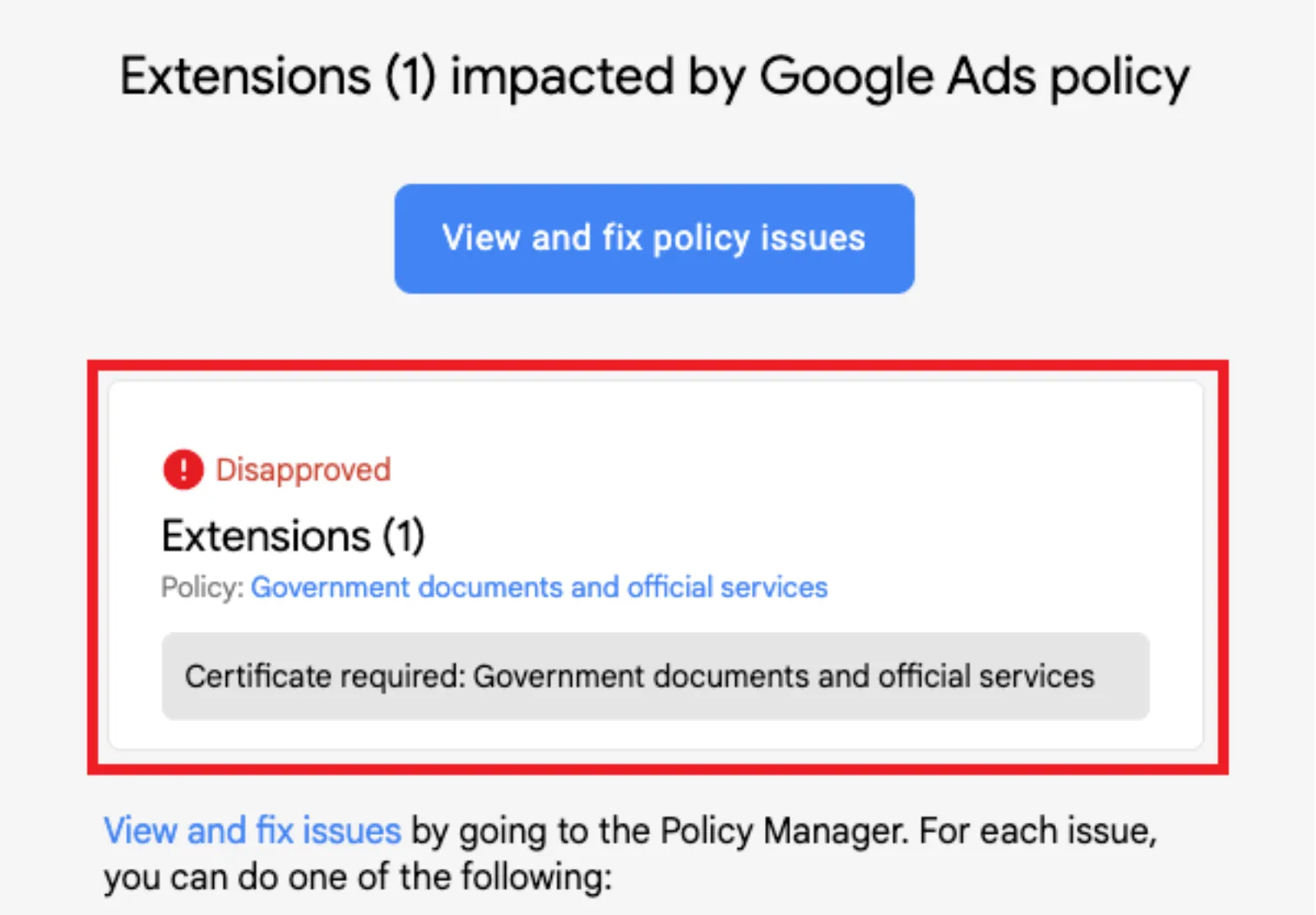
The Elephant in the Room: The Google Ads Authorised Provider Policy
Google has a strict policy to protect users from fraud and scams, especially when it comes to sensitive and important topics like government services. Think about it: someone looking for a passport application or a driver’s license renewal is vulnerable. They need to know they’re dealing with a legitimate business, not a fraudulent one looking to steal their personal information or overcharge them for a service they could get for free.
To combat this, Google requires advertisers who provide “government documents and official services” to be certified as an “authorised provider.” This is the hidden rule. It’s not just a suggestion; it’s a hard requirement. If you are not a government entity yourself, you must prove that the government has given you explicit permission to offer that specific service.
This isn’t just for businesses that are direct government contractors. It applies to a whole range of services, including:
- Passport and visa application assistance: Even if you’re a travel agency helping with paperwork, you fall under this.
- Driver’s license renewal services: Any third-party service helping with renewals is impacted.
- Business registration numbers: If you help people get an EIN or other business ID, you need to be verified.
- Background checks and criminal record searches: Services that access official records are included.
- Unclaimed tax rebate services: If you’re helping people find and claim money owed to them by the government.
The list is extensive and often surprising. Many businesses think they are just providing a “convenience service” and don’t realise they are directly in the scope of this policy.
 LIVE
Live every Tuesday at 2pm UK. Bring your marketing questions.
Get your Google, local SEO and AI questions answered live.
The Proof Is In The Documentation
So, how do you get around this? You don’t. You need to follow the process and get verified.
The core of the “authorised provider” policy is proving that your business is legitimate and has the official go-ahead from the government body it’s working with. This means more than just having a nice website. You need to show Google concrete proof.
What does that look like?
- Direct linkage from a government website: The absolute strongest piece of evidence is a link from an official government website (like a .gov domain) that explicitly lists your business as an authorised provider for that service. This is the gold standard.
- Explicit reference to authorisation: If a direct link isn’t possible, you need to be able to show Google documentation, like a contract or official letter, from the government agency stating that you are authorised to provide the service. This document should be detailed and clear.
Once you have this, you can go through Google’s Advertiser Identity Verification Program. This is a multi-step process that often involves providing your business’s legal name, address, and other identifying information. After that, you submit the documentation proving your authorised status.
It can take a few days for Google to review everything, and you might get a few back-and-forth emails asking for more details. Patience and clarity are key here. Don’t submit the same information again if you’re rejected; try to find what might be missing or unclear.
An Exception to the Rule: The “Information Only” Approach
Sometimes, a business isn’t providing the service itself but is instead providing information about the service. For example, a blog post that explains “how to get a passport” without offering to do the work for the user.
In this case, you can apply for an exclusion. The key is to be very careful with your ad copy and landing page. Your ads must clearly state that you are an informational service and not an official provider. Use phrases like “informational guide,” “how-to article,” or “resource centre.” Your landing page should not have forms that collect personal information for official document applications, nor should it look like a government website. Misrepresenting your service, even slightly, will likely lead to a disapproval.
A Final Piece of Advice
Many intermediate advertisers get discouraged by this policy. They think it’s a conspiracy or an unfair hurdle. But remember, the goal is to protect users and maintain trust in the advertising ecosystem. By understanding and working with this policy, you’re not just trying to get your ads approved; you’re building a more credible and sustainable business.
Instead of fighting the policy, embrace it. Get the necessary documentation, go through the verification process, and show Google—and your potential customers—that you are a trusted and authorised source. It might take a little extra work upfront, but it’s the only way to ensure your campaigns for government-related services are successful in the long run.

Written by Uzair Kharawala
Partner at SF Digital Studios, a Google Premier Partner agency. Uzair has been helping businesses grow with Google Ads since 2002 and teaches it every week on YouTube.
Get our best Google Ads tips by email
New articles and videos, straight to your inbox. Unsubscribe any time.