
In January 2026, advertisers noticed that Performance Max would take 15 videos per asset group instead of 5. Nobody got an email. Google did not publish a blog post. People found it by opening the account and seeing a bigger number.
That is how most changes to Google Ads specs arrive. Quietly, inside the interface, weeks before anyone writes them down.
So if you built your images and videos from a cheat sheet you saved last year, some of it is probably wrong now. Not badly wrong. Just wrong enough to cost you reach.
Get your free Marketing Action PlanNot sure where to start? Answer a few questions and get your plan in about a minute. No email needed.
Get my plan →This post gives you the current Google Ads specs for every campaign type, checked against Google's own pages in September 2026. More usefully, it shows you how to spot the next change yourself, in about 15 minutes a quarter.
What Are Google Ads Specs, Really?
Google Ads specs are the size, length and count rules your ads must follow. They set how long a headline can be, what shape an image must be, how long a video can run and how many of each you can add.
Think of them as the bracket on a shop front. Your sign can say anything you like. But if it is the wrong size for the bracket, it will not hang straight, or it will not hang at all.
There are four kinds of specs, and it helps to keep them separate.
- Text limits, such as a 30-character headline or a 90-character description
- Image shapes and sizes, such as 1200 x 628 pixels for a horizontal image
- Video lengths and orientations, such as 10 seconds minimum in horizontal, square or vertical
- Counts, such as 15 headlines or 20 images per ad
Each campaign type has its own set. Search, Performance Max, Demand Gen, Display and Video all differ. That is why a single cheat sheet goes out of date so fast. Five sets of rules can each move on their own schedule.
There is one more thing worth knowing before we go further. A spec has two numbers, the minimum and the recommended. The minimum gets your asset accepted. The recommended gets it shown well. A lot of weak ads come from designing to the minimum.
Why Nobody Tells You When The Specs Change
Google does not send you a message when a limit changes. There is no changelog for specs, and no "what's new" email that lists them.
Changes tend to show up in three places first. The Google Ads interface, where a limit simply goes up. Google Ads Editor release notes, which list new limits when a version ships. And the help pages themselves, which get edited in place with no date on them.
The Performance Max video change is a good example. Industry sites reported it in January 2026 and noted that Google had not formally announced it. It turned up as a line in the Google Ads Editor 2.12 notes and a bigger number in the asset group.
The help pages have moved too. Google's main specs page is now mostly a hub of cheat-sheet images. The actual numbers sit on separate pages for each campaign type. If your bookmark points at an old page, you may be reading figures that no longer apply.
Even Google's own pages do not always agree. At the time of writing, the Search specs page lists a minimum logo size of 128 x 128 pixels. The Demand Gen page lists 144 x 144. Upload your logo at 1200 x 1200 and the question never comes up.
None of this is Google being sneaky. It is simply a very large product changing all the time. But it means the job of keeping up falls on you, or whoever runs your account.
What A Spec Change Actually Costs You
When a spec moves and you do not, nothing breaks loudly. That is the problem. Your ads keep running, so it feels fine.
The cost shows up in four quieter ways.
You leave placements empty. When Demand Gen started taking 4:5 portrait images, advertisers without them simply did not fill that shape as well. Portrait images take up more of a phone screen in a feed. If you have none, you are competing with a smaller picture.
Google fills the gap for you. In Performance Max, if you add no video, Google may build one from your images and text. It can also flip a horizontal video into vertical and square versions. Sometimes that is fine. Often it looks like a slideshow, and it still carries your name.
Your images get cropped badly. If you upload one horizontal image and nothing else, Google will crop it to fit square and portrait slots. Faces lose their foreheads. Text loses its last word. Your logo ends up half off the edge.
Your asset strength drops. Performance Max and Demand Gen rate how complete your assets are. Leave slots empty after a limit goes up and the rating can fall, even though you changed nothing.
Here is a simple way to picture it. Say a builder runs a Performance Max campaign with 5 videos, all horizontal, because 5 was the limit when it launched. The limit is now 15 and Google wants all three shapes. That campaign is now using a third of its video allowance, in one shape out of three. Nothing looks broken. It just gets fewer good placements than it could.
The fix is not a big project. It is a habit. And the habit is simple enough to fit on one page.
The 15-Minute Spec Check At A Glance
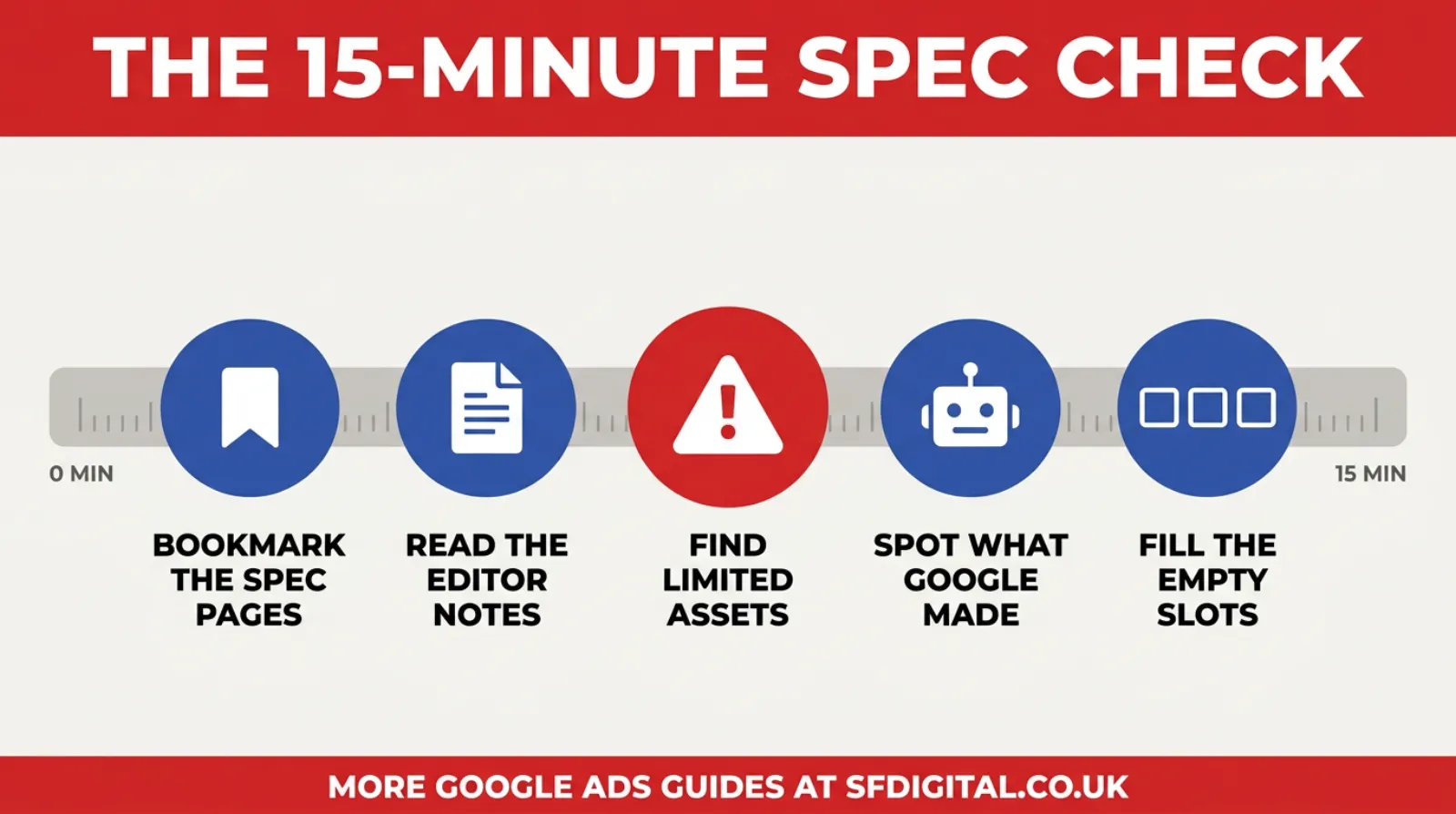
The whole check comes down to five questions. Where do the numbers live now? What changed in Editor? Which assets are flagged? What did Google make for you? And which slots are still empty? The rest of this post walks through each one, then gives you the full specs to check against.
The Google Ads Specs For 2026, Campaign By Campaign
These figures come from Google's own help pages, checked in September 2026. Treat them as your starting point, not the final word. The whole point of this post is that they will move again.
Search Campaigns And Responsive Search Ads
Search is the most stable of the lot, but it still gets new asset types from time to time.
- Headlines: up to 15, each up to 30 characters
- Descriptions: up to 4, each up to 90 characters
- Final URL: up to 2,048 characters
- Square images: 1200 x 1200 recommended, 300 x 300 minimum, up to 20
- Horizontal images: 1200 x 628 recommended, 600 x 314 minimum, up to 20
- Business logo: square, 1200 x 1200 recommended
- Business name: up to 25 characters
Fill all 15 headlines if you can write 15 good ones. Google tests them in different orders. The more strong options it has, the better it can match the ad to the search. Weak filler headlines do more harm than good, though.
Performance Max
Performance Max changes most often, because it runs across every Google channel at once.
- Headlines: up to 15, each up to 30 characters
- Long headlines: up to 5, each up to 90 characters
- Descriptions: up to 5, each up to 90 characters
- Images: up to 20, in horizontal 1.91:1, square 1:1 and portrait 4:5
- Logos: up to 5, square and horizontal
- Videos: up to 15 per asset group, up from 5, each at least 10 seconds
- Video shapes: horizontal 16:9, square 1:1 and vertical 9:16
- Video quality: 1080p recommended, so 1920 x 1080 for horizontal
Google recommends at least one video in each shape. The vertical one matters most, because it is what makes you eligible for YouTube Shorts.
If you add no video at all, Google may make one for you. It builds it from your images and text. If you would rather control what people see, upload your own in all three shapes.
Demand Gen
Demand Gen runs on YouTube, Discover and Gmail, where people scroll rather than search. Its specs lean towards phone-shaped images.
- Headlines: up to 5, each up to 40 characters, but at least one must be 30 or fewer
- Descriptions: up to 5, each up to 90 characters
- Business name: up to 25 characters
- Horizontal images: 1200 x 628 recommended, 600 x 314 minimum
- Square images: 1200 x 1200 recommended, 300 x 300 minimum
- Portrait images: 960 x 1200 recommended, 480 x 600 minimum, in 4:5
- Images: up to 20 of each shape
- Logo: square, 1200 x 1200 recommended, up to 5
- Videos: 10 to 60 seconds, in horizontal, vertical and square
That headline rule catches people out. You can write a 40-character headline, but if none of your five is 30 or under, the ad will not save. Always keep one short headline in the set.
Portrait images are marked optional. Add them anyway. They are the shape that fills the most screen in a feed.
Display
Display has two quite different routes, and the file limits are very different.
- Uploaded image ads, the ones you design as finished banners: 150 KB maximum per file
- Responsive display ads
- Most-used shapes: 1200 x 628 horizontal and 1200 x 1200 square
- Responsive display: supply at least 5 images, 5 short headlines and 5 descriptions
The 150 KB cap on uploaded banners is tight. A detailed photo saved at full quality will blow straight past it. Compress it, or use responsive display instead.
Video And YouTube
YouTube specs depend on the ad format, but the shapes are simple.
- Horizontal video: 16:9, or 4:3 for older footage
- Portrait video: 9:16, or 3:4
- Square video: 1:1
- For Shorts, vertical 9:16 is the one that matters
Film vertically if you can. You can crop a vertical clip to square. You cannot turn a horizontal clip into a good vertical one without losing most of the frame.
The Changes That Caught People Out
Some spec changes are small. These four had a real effect on the accounts that missed them.
The Performance Max Video Limit Tripled
The cap went from 5 videos per asset group to 15. Industry sites spotted it in January 2026 and reported that Google had not formally announced it. Google Ads Editor 2.12 listed it too.
If you set up Performance Max before then, you are likely using a third of the space. The quick win is to add vertical videos first, since that is the shape most accounts are missing.
Demand Gen Got A Portrait Shape
Demand Gen now takes 4:5 portrait images at 960 x 1200. They are optional, which is exactly why so many accounts skip them. But a portrait image takes up more room on a phone than a horizontal one. Skip it, and a rival's ad simply looks bigger than yours.
Demand Gen Headlines Got A Two-Speed Rule
Demand Gen headlines can run to 40 characters. But at least one must be 30 or fewer. Write five long ones and the ad will not save. Keep one short headline in every set and you will never hit it.
Google Started Making Assets For You
In Performance Max, Google can now build videos from your images and text if you add none. It can also flip your horizontal video into square and vertical versions. This is sold as a helpful feature, and sometimes it is. But the output is Google's idea of your brand, not yours.
The only reliable way to avoid it is to fill every slot yourself.
How To Run The 15-Minute Spec Check
This is the habit that replaces the cheat sheet. Do it once a quarter, and any time Google Ads Editor asks you to update.
Step One: Check Where The Numbers Live Now
Go to Google's main specs page in the Google Ads Help Centre. Then click through to the page for each campaign type you run. Bookmark those pages, not the hub. The per-campaign pages hold the current figures.
Do not bookmark a cheat sheet, including this one. Cheat sheets are snapshots. The help page is the source.
Step Two: Read The Editor Release Notes
When Google Ads Editor offers an update, read the release notes before you click install. They take two minutes. New limits often appear there before anywhere else, as they did with the Performance Max video cap.
Step Three: Look For Flagged Assets
In your account, open the asset report for each campaign. Look at the status column. Anything marked Limited or Not eligible needs a closer look.
Hover over the status to see the reason. Most flags are image problems, such as text on photos, blurry images or logos placed over a picture.
Step Four: Find What Google Made For You
In Performance Max, look for assets you did not upload. Google marks them as automatically created. If you find auto-generated video, it means you left a video slot empty. Decide whether you are happy with Google's version or want to replace it with your own.
Step Five: Count The Empty Slots
For each campaign, compare what you have with what is allowed. How many headlines out of 15? How many images in each shape? How many videos in each orientation? Count them all.
Write the gaps down. Then fill the biggest ones first. Vertical video and portrait images are usually top of the list.
That is the whole check. Five steps, about three minutes each. It is small enough to actually do, which is more than you can say for a full account audit.
What The Check Looks Like On One Campaign
Here is a made-up example, so you can see how the five steps fit together. Picture a kitchen fitter in Milton Keynes. They run one Search campaign and one Performance Max campaign, both set up about eighteen months ago.
The First Three Minutes
They open Google's specs hub and click through to the Search and Performance Max pages. They bookmark both. Nothing on the Search page looks different from what they built. The Performance Max page now says 15 videos, not 5.
That one line is worth noting down. It is the first gap.
The Editor Notes
Google Ads Editor offered an update last month, and they clicked through without reading. This time they open the release notes. There is the video limit again, plus a couple of changes to campaign types they do not use. Two minutes, and they can move on.
The Asset Report
In the Search campaign, two image assets show as Limited. Hovering over the status shows the reason. Both have the price written across the photo in big white letters.
That is an easy fix. They upload the same photos without the text, and move the price into a headline.
What Google Made
In Performance Max, three videos are marked as automatically created. The fitter never uploaded any vertical video, so Google built some from the kitchen photos. They play them. They are fine, but they look like a slideshow, and one crops a worktop in half.
The Empty Slots
Now the count. Search has 11 headlines out of 15, and 4 descriptions out of 4. Performance Max has 5 horizontal videos out of a possible 15, no square video, no vertical video and no portrait images.
So the list for next month writes itself. Shoot two short vertical clips on a phone at the next finished job. Add three portrait photos. Write four more Search headlines, including one under 30 characters.
None of that is a big project. It is one afternoon on site and one hour at a desk. And every item on the list is reach they were already paying for but not getting.
Who Should Own The Spec Check
If you run your own ads, the check is yours. Put it in the calendar for the first Monday of each quarter, the same way you would book a van service. It will not happen unless it has a date.
If an agency or a freelancer runs your ads, it should be theirs. But it is worth knowing whether it actually happens. Three questions will tell you.
- When did you last add assets to my Performance Max campaign, and why?
- Have any of my image assets been flagged as Limited in the last three months?
- Are any of the assets in my account made by Google rather than by us?
A good account manager answers all three in a sentence each. If the answers are vague, that tells you something too. Specs are not glamorous work, which is exactly why they get skipped.
Whoever owns it, write the date of the last check somewhere you will see it. A note in your diary is enough. The only rule is that it does not slide past a quarter.
Build Your Assets So The Next Change Does Not Hurt
The check tells you when something has moved. The way you build your assets decides how much work the change creates.
Design To The Recommended Size, Not The Minimum
A 300 x 300 image passes the Search minimum. It also looks soft on a modern phone. Export everything at the recommended size, 1200 pixels on the long or square side. You lose nothing, and you are ready if Google ever raises the minimum.
Keep A Master File For Every Image
Keep the layered design file, not just the exported JPEG. When a new shape arrives, such as 4:5 portrait, you can rebuild from the master in minutes. Rebuilding from a flattened JPEG means guessing where the edges were.
Keep Key Content Away From The Edges
Google crops images to fit different slots. Keep faces, products and any text well inside the frame. Leave a clear margin around the edges. That way, a crop trims background, not your message.
Keep Text Off Your Photos
Text laid over a photo is one of the most common reasons an image asset gets limited. Put your words in the headlines and descriptions, where they belong. Let the image do the showing.
Shoot Video Vertically First
Vertical footage can be cropped to square. It cannot become a good horizontal clip without losing much of the frame, and the reverse is just as bad. So film vertically when you can, and plan a separate horizontal shot for YouTube if you need one.
Name Your Files By Shape And Size
Call a file "roofing-horizontal-1200x628.jpg" rather than "final-v3.jpg". When you run the spec check, you can see at a glance what shapes you have. It sounds fussy. It saves real time.
Write More Headlines Than You Need
Keep a running document of headlines for each product or service, including some under 30 characters. When a limit goes up, you already have tested options ready. You are not writing new copy under pressure.
Frequently asked questions
What size should Google Ads images be in 2026?
Upload horizontal images at 1200 x 628 pixels and square images at 1200 x 1200. Those two sizes work across Search, Performance Max, Demand Gen and responsive display. For Demand Gen and Performance Max, add portrait images at 960 x 1200 too. Keep each file under 5 MB.
How many videos can you add to a Performance Max asset group?
Up to 15, up from the old limit of 5. Google recommends at least one horizontal, one square and one vertical video, each at least 10 seconds long. If you add none, Google may build videos for you from your images and text.
What are the Google Ads headline character limits?
Responsive search ad headlines are 30 characters, with up to 15 per ad. Descriptions are 90 characters, with up to 4. Demand Gen headlines can run to 40 characters, but at least one must be 30 or fewer. Performance Max long headlines can run to 90 characters.
Why is my Google Ads image asset showing as limited?
Usually a policy or quality issue. Heavy text on the image, a logo placed over a photo, blur and awkward crops are the most common causes. Check the status details, fix the flagged problem and upload a clean version at the recommended size.
Where can I find the latest Google Ads specs?
On Google's own help pages. The main specs hub links to a separate page for each campaign type, and those pages hold the current numbers. Cheat sheets and agency blogs, including this one, are snapshots that date.
What happens if I do not upload a video to Performance Max?
Google may create one or more videos for you from the images and text in your asset group. It can also flip a horizontal video you uploaded into square and vertical versions. To keep control, upload your own videos in all three shapes.
Do Google Ads specs change often?
Often enough to matter. Performance Max and Demand Gen change most, because they run across the most placements. Search changes least. A quarterly check is enough for most small businesses.
Do I need to rebuild my ads every time a spec changes?
No. Existing assets usually keep running when a limit changes. What you lose is the new space, such as extra video slots or a new image shape. Add assets to fill the gap rather than rebuilding what already works, and keep your master files so new sizes take minutes, not days.
Keep Reading
If you are working through your assets, these six pick up where this post leaves off.
- Google Ads Image Assets - How Google Ads Image Assets Turned My Boring Text Ad Into A Click Magnet
- Mastering The Fundamentals Of Responsive Search Ads (RSAs) In Google Ads
- A Simple Guide To Google Performance Max Campaigns For Your Business
- Demand Gen Vs. Performance Max: Which Google Ads Campaign Is Right For You?
- Google Ads Disapproved Text Or Graphic Overlays - Graphic Overlays In Your Ads? The Design Choice That's Getting Marketers Banned
- Your Google Ads Product Feed Is What AI Shopping Agents Actually Read
The first two cover the ad formats themselves. The middle two help you pick the right campaign type. The last two cover image problems and the product data Performance Max also runs on.
The Spec Sheet Is Not The Job
It is tempting to treat specs as a box to tick once. You look them up, you build your assets, and you move on.
But Google Ads is not a fixed product. It changes every few weeks, and most of those changes arrive without a word. The businesses that keep their reach are not the ones with the best cheat sheet. They are the ones who check.
The good news is that checking is not hard. Fifteen minutes a quarter covers it. Bookmark the right pages, read the Editor notes, look for flagged assets, spot what Google made for you and fill the gaps.
Start today with one campaign. Count its videos. Count its portrait images. Look for anything marked Limited.
If you find gaps, you have just found reach you were leaving on the table. And if you would rather someone else kept watch, that is exactly the kind of work we do for our clients every week.

Written by Uzair Kharawala
Partner at SF Digital Studios, a Google Premier Partner agency. Uzair has been helping businesses grow with Google Ads since 2002 and teaches it every week on YouTube.
Get our best Google Ads tips by email
New articles and videos, straight to your inbox. Unsubscribe any time.