
The email is short. Your Google Ads account has been suspended. It names a policy you have probably never read. Then it gives you a button marked Contact Us.
That is usually all you get. Your ads have stopped, your phone has gone quiet, and the only clue is two or three words like "circumventing systems".
If your Google Ads account is suspended right now, the first thing to know is this. The next thing you do matters more than anything you did before. One common reaction turns a fixable suspension into a permanent one.
Get your free Marketing Action PlanNot sure where to start? Answer a few questions and get your plan in about a minute. No email needed.
Get my plan →This guide explains what each suspension reason usually means, what to check, and how to appeal once and properly. It is written for business owners, not for policy lawyers.
What A Google Ads Suspension Actually Means
A suspension is Google stopping your whole account, not just one ad. Every ad stops running. You cannot advertise from that account until Google reinstates it.
That is different from a disapproval. A disapproval stops one ad or one asset. The rest of your account keeps running. A suspension switches the whole thing off.
Google's help page is blunt about two more effects. New accounts the advertiser tries to create may also be suspended. And accounts related to the suspended one may be suspended too.
Google treats a suspension as permanent unless you appeal and win. That sounds grim, but it is not the end. Many suspensions are overturned once the cause is fixed and properly shown.
You are also not alone. Google's 2025 Ads Safety Report says it suspended 24.9 million advertiser accounts worldwide that year. About 593,000 of those were in the UK.
Some were scammers. Plenty were ordinary businesses caught by an automated check. The same report says Google cut incorrect suspensions by 80% in 2025. That is good news, and it also tells you how many wrong ones there used to be.
Why The Email Tells You So Little
The suspension email names the policy. It rarely says what triggered it. There are two reasons for that.
The first is scale. Most suspensions are made by automated systems, and those systems work on signals, not stories. They see a pattern, such as a payment card seen before or a website that redirects, and they act on it.
The second is deliberate. If Google told everyone exactly which signal tripped the alarm, bad actors would learn to avoid it. So the message stays vague on purpose.
That leaves you with a label and no explanation. Your job is to work backwards from the label to the likely cause. The rest of this post is about doing exactly that.
Did Google Warn You First?
It depends on the policy. Google splits suspensions into a few groups, and they work very differently.
Serious Policies, With No Warning
Google calls some policies egregious. Breaking one gets the account suspended straight away, with no warning. The list includes circumventing systems, counterfeit goods, malicious software, unacceptable business practices and coordinated deceptive practices.
If your email names one of these, there was no earlier warning to miss. Do not waste time looking for one.
Repeated Breaches, With Strikes
For most other policies, Google uses a strike system. You get up to three strikes, each with a tougher penalty. Google says it sends a warning at least seven days before a suspension.
If you were suspended under this system, check your email and the notifications bell in your account. There was probably a warning you did not see.
Billing And Security
Some suspensions have nothing to do with ad content. Chargebacks, unpaid balances and suspicious payment activity all count. So does unauthorised access, where Google thinks someone else got into your account.
These are often the easiest to fix, because the cause is usually on the billing side rather than on your website.
What Each Suspension Reason Usually Means
This is the part the email leaves out. Below are the reasons small businesses hit most often, with what each one tends to mean in practice and what to check first.
One number to keep in mind. StubGroup, a firm that handles suspension appeals, says circumventing systems accounts for about 37% of the suspensions it sees. It is the most common, and the most misunderstood.
Circumventing Systems
What Google means: it thinks you are trying to get round its review, or around an earlier ban.
What it usually is: a link to another account Google has already suspended. That link can be a shared payment card, the same website, the same login, the same phone number or the same person. It can also be a website that sends people somewhere different from where the ad says. Sometimes it is a hacked site with a hidden redirect.
What to check:
- Has anyone ever run Google Ads for this business, or this website, in another account?
- Has your payment card been used on any other Google Ads account, including a freelancer's?
- Does your site redirect, show different pages to different visitors or use tracking templates that bounce people around?
- Has your site been hacked? Check the Security issues report in Google Search Console.
Unacceptable Business Practices
What Google means: it thinks your business might mislead or take advantage of customers.
What it usually is: a website that does not look trustworthy enough. Missing contact details, no physical address, no company information, prices that are hard to find or claims you cannot back up. Fake countdown timers and made-up reviews can trigger it too.
What to check:
- Does your site show your company name, address, phone number and email?
- Are your prices, fees and delivery costs clear before checkout?
- Can every claim on the site, such as "UK's number one", be backed up?
- Do your terms, privacy policy and returns policy exist and make sense?
Misrepresentation
What Google means: it thinks your ads or site leave out important information or promise something you do not deliver.
What it usually is: close cousin of the one above. Hidden costs, a "free" offer with conditions buried out of sight, or a site that does not say clearly who you are.
What to check: read your landing page as a sceptical stranger would. If anything important only appears in small print, move it up.
Suspicious Payment Activity
What Google means: something about the way you pay looks risky.
What it usually is: the name or address on the card does not match the account. Or the card was used on another suspended account. Or there was a chargeback. Prepaid and virtual cards can also raise the flag.
What to check:
- Does the name on the card match the business or person on the account?
- Does the billing address match what your bank holds?
- Have you ever disputed a Google Ads charge with your bank?
- Has this card been used anywhere else in Google Ads?
Unpaid Balance
What Google means: you owe Google money.
What it usually is: a failed payment, often an expired card. This is the simplest one. Pay the balance and the account usually comes back.
Counterfeit Goods
What Google means: it thinks you sell fake branded products.
What it usually is: selling branded goods without proof they are genuine, or using brand names in ads for products that are not that brand. Resellers of genuine stock get caught here too.
What to check: can you show supplier invoices proving the stock is genuine? Are brand names used only for products that really are that brand?
Malicious Software
What Google means: your site may harm visitors.
What it usually is: a hacked website. The owner often has no idea. A plugin gets compromised, a script gets injected, and Google's scanners find it before you do.
What to check: the Security issues report in Google Search Console, and a scan from your web host or developer. Clean the site first, then appeal.
Five Steps, In This Order
Most people do these in the wrong order. They appeal first, get turned down, and only then start looking. Here is the order that gives you the best chance.
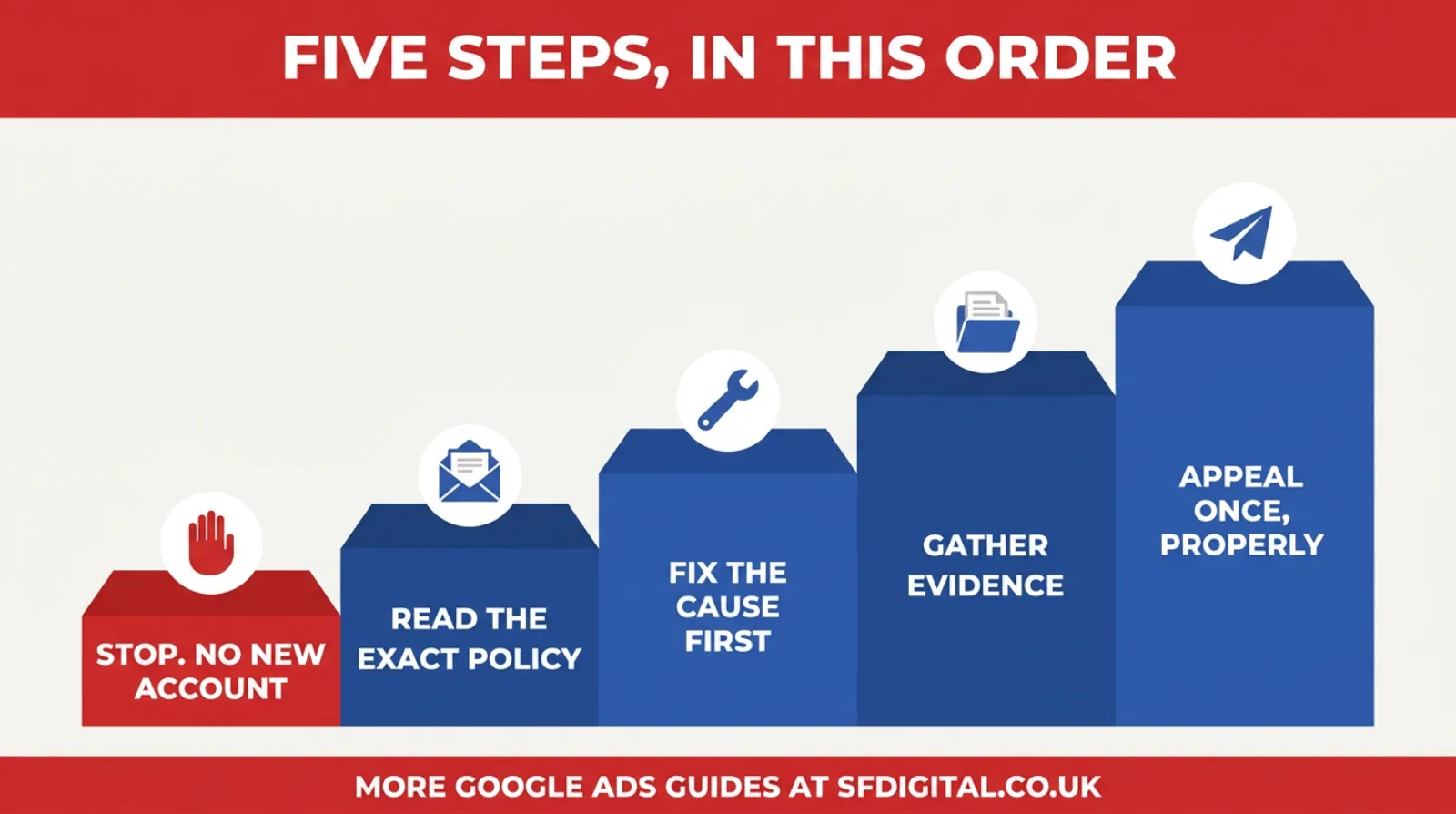
The first step is the one that protects everything else. The last step is the one most people rush. Everything in between is where appeals are really won.
Step One, Stop And Do Not Open A New Account
This is the big one. Do not open a new Google Ads account to get round the suspension.
It feels like a quick fix. It is the opposite. Google says new accounts created by a suspended advertiser may also be suspended. Worse, opening one is exactly what the circumventing systems policy is about.
So a business suspended for a billing issue can open a new account and turn a simple case into a serious one. Do not do it. Do not ask a friend or a freelancer to run ads for you in their account either. Google looks for that link.
While you are stopping, stop making changes to the suspended account too. You want the account to look the way it did when Google reviewed it, apart from the fixes you make on purpose.
Step Two, Read The Exact Policy
Open the email and the notification inside your account. Write down the exact policy name, word for word. Google says the email lists every policy you were suspended for.
Then read Google's own page for that policy, all of it. The policy pages are dull, but they often contain the exact example that matches your case. Use the section above as your translation.
If there is more than one policy listed, deal with all of them. An appeal that fixes one and ignores another will fail.
Step Three, Fix The Cause First
Fix the problem before you appeal, not after. Google reviews your account and your site as they are when the appeal lands.
That might mean adding your address and company number to the website. It might mean removing a claim you cannot prove, cleaning a hacked site, updating a payment card or removing an old user from the account.
Write down every change you make, with the date. You will need that list in step five.
Also check who has access. Remove anyone who no longer works with you. Old freelancers and former staff with admin access are a common loose end.
Step Four, Gather Your Evidence
Before you write a word of the appeal, build a small evidence pack. What you need depends on the reason, but most packs include some of these.
- Proof your business is real, such as your Companies House record or a utility bill with the business address
- Screenshots of your website showing contact details, prices and policies
- Supplier invoices, if the reason is counterfeit goods
- Bank statements showing the card belongs to the business, if the reason is payments
- A clean scan report or a note from your developer, if the reason is malware
- Your list of changes from step three
Keep each document clear and readable. A blurry phone photo of a bill can do more harm than good.
Some advertisers are asked to complete Google's advertiser verification during an appeal. Google says that if verification fails after three attempts, you cannot appeal. So take it slowly, use documents that match your account details exactly, and get it right first time.
Step Five, Appeal Once And Properly
Use the Contact Us link in the suspension notice. Fill in the form carefully. Then write your explanation.
Keep it short and factual. Three short parts work well.
- What you found. Name the policy and what you think triggered it.
- What you changed. List the fixes, with dates.
- What you are attaching. Say what each document proves.
Leave out emotion and blame. "We did nothing wrong" without evidence gets nowhere. "We found an old account run by a previous agency on the same card, we have removed the card and closed that access, and here is proof" gives the reviewer something to act on.
Then wait. Google's 2025 report says 99% of advertiser appeals were resolved within 24 hours. Complex cases can take longer. Sending the same appeal three times does not speed it up.
If the appeal fails, go back to step two. Something was missed. Find it before you try again. Google says you can appeal for at least six months after the suspension, so there is time to get it right.
What A Good Appeal Looks Like
It helps to see one. Here is a made-up example for a made-up business, written the way a reviewer would want to read it.
We were suspended under the circumventing systems policy. On checking, we found our business card had also been used on an older Google Ads account set up by a previous agency in 2023. That account was suspended last year, and we were not told.
We have removed that card from all Google Ads billing. We have confirmed with the agency that the old account is closed, and removed their access to our current account. Our website has no redirects and the Search Console security report is clear.
Attached: our Companies House record, a bank statement showing the new card in the company name, the agency's written confirmation and a screenshot of the Search Console report.
That is the whole thing. It is under 150 words. It names the policy, explains the likely cause, lists the fixes and says what each document proves.
Notice what it does not do. It does not complain, plead or threaten to spend elsewhere. It does not claim the business has done nothing wrong. It simply gives the reviewer an easy reason to say yes.
A Worked Example, From Email To Appeal
Here is how the five steps fit together for one made-up business. Picture a small plumbing firm in Bedford. Their ads have run for two years with no problems. One Monday, the account is suspended for circumventing systems.
The owner's first instinct is to open a new account with a different card. They do not, because that would make it worse. Step one done.
They read the policy page. It mentions accounts linked to earlier suspensions. That rings a bell. A freelancer ran some ads for them a few years back, before they moved everything in-house. Step two done.
They ring the freelancer. It turns out the freelancer set up a separate account at the time, using the firm's card, and later let it lapse with an unpaid balance. Google suspended that old account. The shared card linked the two.
So the fix is clear. They pay the old balance, ask the freelancer to confirm the account is closed, and switch to a new card in the company name. They also add the company number and full address to the website footer while they are at it. Step three done.
They gather the Companies House record, the bank statement for the new card, the freelancer's email and a screenshot of the updated footer. Step four done.
They write a short appeal like the one above and submit it once. Step five done.
In this example, the problem had nothing to do with anything the owner did that week. That is typical. The cause of a suspension is often old, forgotten and sitting in someone else's account.
If An Agency Or Freelancer Runs Your Ads
Many suspensions involve someone other than the business owner. That does not make them anyone's fault. But it does mean you need to know how your account is set up.
Ask three things, and get the answers in writing.
- Who owns the Google Ads account? It should be your business, with you as an admin.
- Whose card pays for it? It should be a card in your business name.
- Has anyone else ever run Google Ads for this website in a different account?
If an agency manages you through their own manager account, that is normal. But if one of their other clients breaks a rule, linked accounts can sometimes be caught up in it. Keeping the account and the card in your own name reduces that risk.
When you part ways with an agency or freelancer, remove their access the same day. Keep a note of any accounts they created. If one of those is ever suspended, you will know where to look.
Myths That Make Suspensions Worse
A few ideas get passed around online that sound sensible and do real damage.
Spending More Will Help
It will not. Suspensions are decided by policy teams and automated systems, not by sales. Promising to spend more does not change the outcome.
A New Domain Will Get You Round It
It will not. A new website with the same business, same card or same people behind it is still linked. It is also a textbook example of circumventing systems.
Appealing Again And Again Speeds It Up
It does not. The same appeal sent five times is still the same appeal. Each failed attempt makes the next reviewer's job harder. Fix, then appeal once.
Ringing Google Support Will Sort It
Support staff can explain the process and sometimes check the status. They cannot overturn a policy decision on the phone. The appeal form is the route that counts.
It Must Be A Mistake, So Waiting Will Fix It
Sometimes suspensions are mistakes, and Google does reverse them. But nothing happens until you appeal. Waiting does not unsuspend an account.
What To Do While You Are Suspended
A suspension can last hours or weeks. Your business still needs customers in the meantime.
Lean on the channels you already own. Update your Google Business Profile, post fresh photos and ask recent customers for reviews. Email your past customers. Ring the ones who have not been in touch for a while.
If you have an offer running, tell your regular customers directly. A short email or text to people who already know you often brings in more work than a week of ads to strangers.
This is also a good moment to look at your website with fresh eyes. The fixes you made for Google, such as clear contact details and honest pricing, usually help real visitors convert too.
What you should not do is find another way into Google Ads. No new account, no borrowed account, no agency account on your behalf. That is the one route that can make the suspension permanent.
How To Stop It Happening Again
Once you are back, a few habits make a repeat far less likely.
- Keep one Google Ads account per business, and keep a record of any old ones
- Pay with a card in the business name, with a billing address that matches your bank
- Complete advertiser verification as soon as Google asks, not at the deadline
- Show your company name, address and phone number on every page of your site
- Keep prices, fees and delivery costs clear before checkout
- Check the notifications bell in your account every week, and act on any warning within seven days
- Remove users who no longer need access
- Keep your website patched, and check Search Console for security issues each month
None of these takes long. Together they remove the most common triggers.
Frequently asked questions
Why was my Google Ads account suspended?
Google suspends accounts for serious policy breaches, repeated policy breaches, billing problems or signs of unauthorised access. The suspension email names the policy. The most common are circumventing systems, unacceptable business practices and suspicious payment activity.
How do I get my Google Ads account unsuspended?
Find the exact policy in the email, fix the cause on your site and in your account, gather evidence, then appeal through the Contact Us link in the notice. Some advertisers must complete advertiser verification before the appeal is reviewed.
Can I open a new Google Ads account after a suspension?
No. Google says new accounts created by a suspended advertiser may also be suspended. Opening one counts as getting around the suspension, which is a circumventing systems violation in its own right.
How long does a Google Ads appeal take?
Google's 2025 Ads Safety Report says 99% of advertiser appeals were resolved within 24 hours. Complex cases and those needing verification can take longer. You can appeal for at least six months after the suspension.
Is a Google Ads suspension permanent?
Google treats it as permanent unless you appeal and the account is reinstated. Many suspensions are overturned once the cause is fixed and shown with evidence, so it is serious but not always final.
Did Google warn me before suspending my account?
It depends on the policy. For serious policies such as circumventing systems or counterfeit goods, Google suspends straight away with no warning. For repeated breaches of other policies, it uses strikes and warns you at least seven days before suspending.
Can a suspension affect my other Google Ads accounts?
Yes. Google says accounts related to a suspended account may also be suspended. Related can mean a shared payment card, login, website or manager account, which is why one suspension sometimes spreads.
Should I pay a reinstatement service to appeal for me?
You do not have to. The appeal form is free, and most cases come down to finding the cause, fixing it and showing evidence. A specialist can help with complex or repeated cases, but be wary of anyone who promises a guaranteed reinstatement. Nobody outside Google can guarantee that.
Keep Reading
If you are working through a suspension or trying to avoid one, these five cover the problems that most often sit behind it.
- How To Complete Advertiser Identity Verification For Google Ads
- How To Fix Disapproved Ads In Google Ads - How To Troubleshoot Google Ads Disapprovals In Minutes
- Google Ads Disapproved Due To Compromised Site - Google Thinks Your Site Is Compromised? Here's What To Do Before It's Too Late
- Google Ads Disapproved Malicious Software - Google Flagged You For Malware? Even Clean Sites Are Getting Disapproved - Here's Why
- Google Ads Disapproved Destination Not Working - Destination Mismatch? The Landing Page Error You Didn't Know You Were Making
The first one matters because verification often sits inside the appeal. The next three cover the website problems behind many suspensions. The last covers the redirect issues that Google can read as circumventing.
A Suspension Is A Problem To Solve, Not A Verdict
When the email lands, it feels personal. It feels like Google has decided you are a bad business.
Usually it has not. An automated system has seen a pattern it does not like. Your job is to find that pattern, fix it and show your working.
That takes a calm afternoon, not a lawyer. Stop, read the exact policy, fix the cause, gather evidence and appeal once, properly.
And whatever you do, do not open a new account. That is the one move that can turn a bad week into a permanent ban.
If you would rather have someone who has read every one of these policy pages do the detective work, that is exactly the kind of problem we help businesses with.

Written by Uzair Kharawala
Partner at SF Digital Studios, a Google Premier Partner agency. Uzair has been helping businesses grow with Google Ads since 2002 and teaches it every week on YouTube.
Get our best Google Ads tips by email
New articles and videos, straight to your inbox. Unsubscribe any time.