
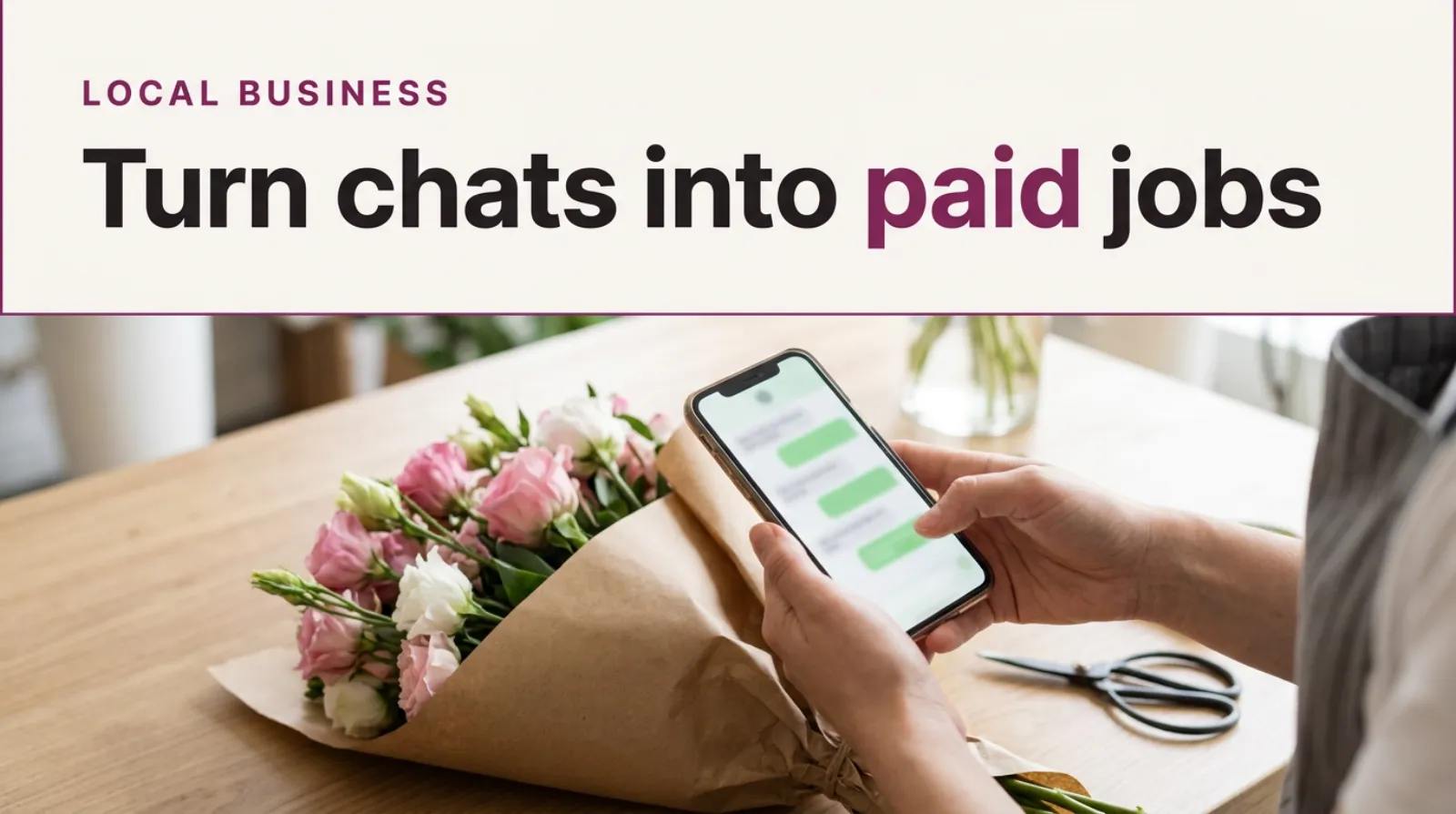
Your customers already have WhatsApp open. The question is whether they are using it to talk to you or to your competitor.
Using WhatsApp for a local business comes down to three jobs. Broadcast lists and Status keep you in front of past customers, one to one and through daily photos of your work. A payment link sent in the chat gets you paid the same day.
That's the short answer. The rest of this post shows how to set each one up. It covers the UK rules too, and how to tell if it's bringing in work.
Get Found, Get Chosen, Get Your Time Back
A free one-day marketing seminar in Milton Keynes · 13 January 2027
Get your free Marketing Action PlanNot sure where to start? Answer a few questions and get your plan in about a minute. No email needed.
Get my plan →Most local owners already use WhatsApp every day. They just use it like a phone, not like a shop counter.
Quotes go out as photos of a notepad, and payment chases sit in a personal chat right next to the family group and the school mums' thread. Nobody hears from you again once the job is done. That's a waste.
A quick note on where this comes from. SF Digital Studios looks after Google Ads, websites and local marketing for small firms around Leighton Buzzard, Milton Keynes and beyond.
The facts below come from WhatsApp's own pages, Ofcom, the ICO and the payment firms' price lists. Where something is our view rather than a fact, we say so.
What Is WhatsApp Business, And Is It Free?
WhatsApp Business is a free app from WhatsApp, built for small firms. It works like normal WhatsApp. It adds a business profile, a catalogue, automatic greeting and away messages, quick replies and labels for sorting chats. You download it from the App Store or Google Play. Then you run it on your business number without paying a penny.
That last part matters a lot. The free app is all most local firms ever need. Start there.
There's also a paid version, the WhatsApp Business Platform.
It's built for bigger firms that send thousands of messages a month through software.
Meta charges per message on it, so it is not where a one-van plumber or a two-chair salon should start.
Here's what the free app gives you.
- A business profile with your address, opening hours, website and a short description.
- A catalogue where customers can scroll through your services or products with prices.
- A greeting message that goes out when someone messages you for the first time.
- An away message that replies when you are closed or on a job.
- Quick replies, which are saved answers you send with a shortcut.
- Labels, so you can tag chats as new enquiry, quoted, booked or paid.
None of that is clever. It's just tidy. But together it turns a chat app into something closer to a front desk that never shuts.
One rule before you start.
WhatsApp Business needs its own phone number.
If your work number is already on normal WhatsApp, you can move it across and keep your chats. You just can't run both apps on the same number.
Why Should A Local Business Use WhatsApp?
Because that is where your customers already are. According to Ofcom's Online Nation report, published in December 2025, 90% of UK adults online use WhatsApp. Only YouTube and Facebook reach more people.
No other channel you own reaches that many people in your town. Not your email list, not your Facebook page and not your website. Nothing comes close.
There is a second reason, and it's about speed. A message on WhatsApp usually gets read within minutes, while an email to the same customer can sit unopened in a crowded inbox for days before anyone looks at it.
For a local business, speed often decides who gets the job.
Say three roofers get asked for a quote. The one who replies first with a clear price and a photo has a real head start.
There is a third reason too.
WhatsApp keeps the whole job in one thread.
The enquiry, the photos, the quote, the date, the payment and the thank you all sit together. When a customer comes back in two years asking for the same thing again, you can scroll up the chat and see exactly what you did, what you charged and when.
Think about how your best customers found you.
Most came from a referral or from Google, then picked up the phone or sent a message.
WhatsApp won't replace Google. It is what you use to keep the customers Google already sent you.
That's the real value. It's cheap, too. Winning a new customer costs money, often a lot of it, but keeping an old customer in touch costs you one message and about thirty seconds of your time.
Your WhatsApp Job, From First Message To Paid
Every job that runs well on WhatsApp follows the same five steps.
The enquiry comes in and you reply fast. The quote goes out with a deposit link.
The job gets done and you take the final payment in the chat. Then the customer joins your list for next time.
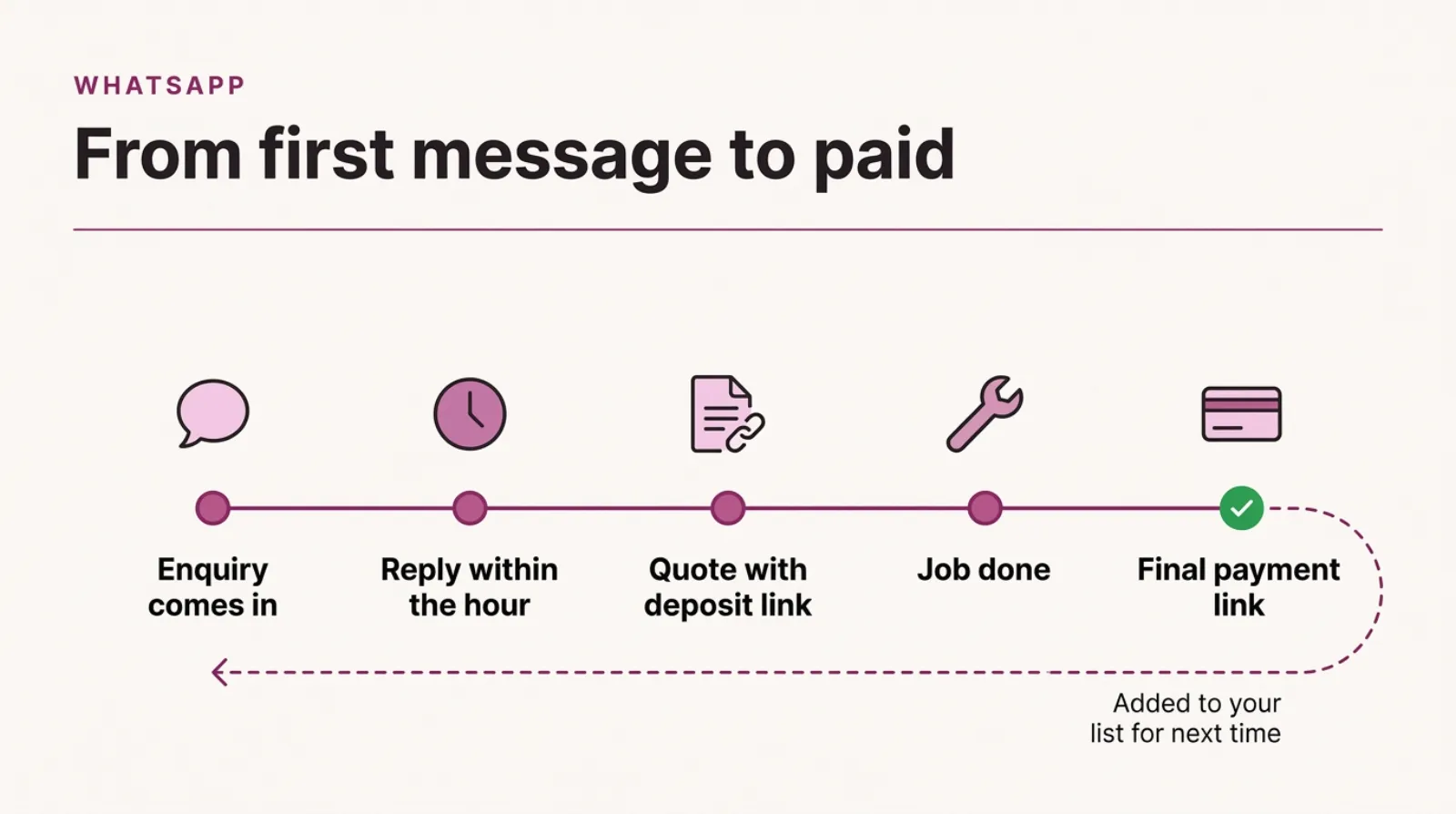
A five-step timeline of a local job run on WhatsApp, from the first message and a fast reply, through a quote with a deposit link and the finished job, to the final payment in the chat, with the customer added to a broadcast list for next time.
The rest of this post walks through each step, starting with the setup that makes it all work.
How Do I Set Up WhatsApp Business Properly?
Download the WhatsApp Business app, register it on your business number and fill in every field of the profile. Then set a greeting message, an away message and five or six quick replies. That takes about an hour, and it is the hour that makes everything else work.
Here's the order we'd follow.
- Fill in the profile. Add your logo, a one-line description, your address or service area, opening hours, website and email.
- Build the catalogue. Add your main services with a photo, a short description and a "from" price.
- Write the greeting message. Thank them, say when you will reply and ask for the one detail you always need.
- Write the away message. Say when you're back and give an emergency number if you have one.
- Save your quick replies. Prices, areas you cover, how to pay, how to book and your review link.
- Set up labels. New enquiry, quoted, booked, paid and repeat customer are enough to start.
A good greeting message does a lot of quiet work.
Something like "Thanks for getting in touch with Hart's Plumbing. Send us a photo of the problem and your postcode, and we will reply within the hour". That one line saves you three messages of back and forth.
Ask for the detail you always need in the first reply. A dog groomer needs the breed, a roofer needs a photo of the roof and a tutor needs the child's year group before they can say anything useful at all.
Then get the number out there.
Add a WhatsApp button to your website.
Put a click-to-chat link on your Google Business Profile, your invoices and your van. WhatsApp lets you share a short link and a QR code straight from the app's settings, so you do not need any extra tools.
One more tip.
If two of you answer messages, link the same account to a few extra devices.
A tablet in the shop or a laptop in the office both work. You don't need to pass one phone around.
How Do Broadcast Lists Work On WhatsApp Business?
A broadcast list sends one message to lots of customers at once. Each person gets it as a normal one-to-one chat from you. They cannot see who else got it, and if they reply, only you see the reply. Each list holds up to 256 contacts.
There's one catch that trips up almost everyone.
A broadcast only reaches people who have saved your number in their phone. If they have not, the message simply doesn't arrive, and WhatsApp will not tell you.
That's why the greeting message and the end of every job matter so much.
Ask customers to save your number. Every single time. Give them a reason: "Save this number and you will be first to hear about cancellations and winter offers".
To set one up, open the app and look for broadcast lists in the menu. Pick your contacts, name the list and you're ready.
Keep lists small and specific. It pays off.
A list called "Boiler customers 2025" is far more useful than one called "Everyone", because you can send it a message that only makes sense to those people.
You can send a reminder about annual servicing to the boiler list and a cancellation slot to the regulars.
Here are a few messages that work well on a broadcast list.
- A cancellation slot for tomorrow, offered to regulars first.
- A yearly reminder, such as a boiler service, an MOT or a dental check-up.
- A seasonal heads-up, such as gutter cleaning before winter.
- A new service, explained in two lines with a photo.
- A thank you after a busy month, with a link to leave a review.
Send fewer broadcasts than you think. Once or twice a month is plenty. More feels pushy. If people feel spammed, they'll block you, and enough blocks can get your number restricted.
You may also see a newer option in some apps called business broadcasts.
WhatsApp's features page says it lets you message people even if they have not saved your number.
It's only available to eligible users in some countries, so check your own app before you plan around it.
Should You Use A Broadcast List, A Group, Status Or A Channel?
Use a broadcast list for offers and reminders and Status for everyday proof of your work. Keep groups for a small team or a club. Channels suit firms with a big following. Most local businesses need the first two and can ignore the rest.
The table below shows the difference at a glance.
| Broadcast list | Group | Status | Channel | |
|---|---|---|---|---|
| Who gets it | Up to 256 contacts you pick | Everyone in the group | Saved contacts, both ways | Anyone who follows you |
| Can customers see each other? | No | Yes, names and numbers | No | No |
| Do replies stay private? | Yes | No, everyone sees them | Yes | Reactions only |
| How long it lasts | Stays in their chat | Stays in the group | 24 hours | Stays on the channel |
| Best for | Offers and reminders | Teams and clubs | Daily proof of work | Big followings |
The group is the one to be careful with.
Putting customers in a group shares their phone numbers with each other. For most businesses that is a privacy problem waiting to happen. It gets noisy fast.
A broadcast list gives you the reach of a group without that risk. Each customer feels like you messaged them alone.
Channels are WhatsApp's one-way feed, a bit like following a page.
They are fine if you have a big local following, such as a popular café.
For a typical trade or service firm, Status does the same job better because it reaches people who already know you.
How Do You Use WhatsApp Status For A Business?
Post a photo, a short video or a line of text to Status. It shows for 24 hours to customers who've saved your number, as long as you've saved theirs too. It's free, it takes seconds and it keeps you in front of past customers without sending them a message.
Think of Status as the window of your shop.
People glance at it while they scroll through their friends' updates, and while most of them won't reply, they quietly remember that you're busy and doing good work.
What should you post? Things that prove you're good at the job.
- A before and after photo of today's work.
- A short video of a finished kitchen, garden or haircut.
- A screenshot of a new Google review, with the customer's name hidden.
- A cancellation slot that's free tomorrow.
- A quick tip, such as how to bleed a radiator.
Post two or three times a week, not ten times a day. You want to stay in view, not fill up someone's screen.
Keep the photos real. Nobody wants polish.
A slightly messy van photo of a finished job beats a polished stock image every time. People can spot stock photos instantly, and they do not trust them.
You can also see who has viewed each update, as long as read receipts are on.
Over a few weeks, you'll notice the same past customers checking in. Those are the warmest people to contact when you have a gap in the diary.
A small warning.
Status is visible to all of your saved contacts unless you change the privacy settings.
 LIVE
Live every Tuesday at 2pm UK. Bring your marketing questions.
Get your Google, local SEO and AI questions answered live.
If your business phone has friends and family on it, check who can see your updates before you start posting.
How Do I Get Paid Through WhatsApp In The UK?
Send a payment link in the chat. You create the link in an app such as Stripe, SumUp, Square or your bank's business app. Paste it into WhatsApp and the customer pays by card or Apple Pay in a few taps. WhatsApp's own built-in payments are not available for UK businesses.
That's the bit most guides skip.
WhatsApp has an in-app payments feature, but it only runs in a handful of countries such as India and Brazil. In the UK, the link is the answer.
The good news? A link works just as well.
The customer taps it, a secure checkout page opens on their phone and the money lands in your account, usually within a day or two depending on the provider. You get a notification, and the chat shows exactly when you asked.
Here is what that costs.
As of November 2026, Stripe's UK pricing page lists 1.5% plus 20p for standard UK cards.
SumUp's UK pricing page lists 2.5% for online payments, which includes payment links, with no monthly fee.
On a £400 job, that is £6.20 with Stripe or £10 with SumUp.
Most owners find that well worth it, because getting paid on the day beats chasing an unpaid invoice for three weeks while the customer keeps saying it's in hand.
Here's how to use links at each stage of a job.
- Deposits. Send the quote with a deposit link straight underneath. It turns a "yes" into a booking.
- Final payment. Send the link the moment the job is done, with a photo of the finished work.
- Small items. For a shop, send a link for a product someone asked about in the chat.
- Late payers. A polite nudge with the link already in it gets paid far faster than "please pay your invoice".
Put the amount and the job in the message above the link. "Here is the link for the £120 deposit for Thursday's bathroom tiling" is clear and easy to trust. A bare link with no context looks like a scam. People won't tap it.
Bank transfer still works.
Some customers prefer it, so keep your account details in a quick reply. But a card link is faster, and it's the one most people will use.
Five Checks Before You Send A Broadcast
Before any broadcast goes out, run through five quick checks. Make sure they asked to hear from you. Keep it to one offer, short and personal. Give one clear next step, and tell them how to stop.
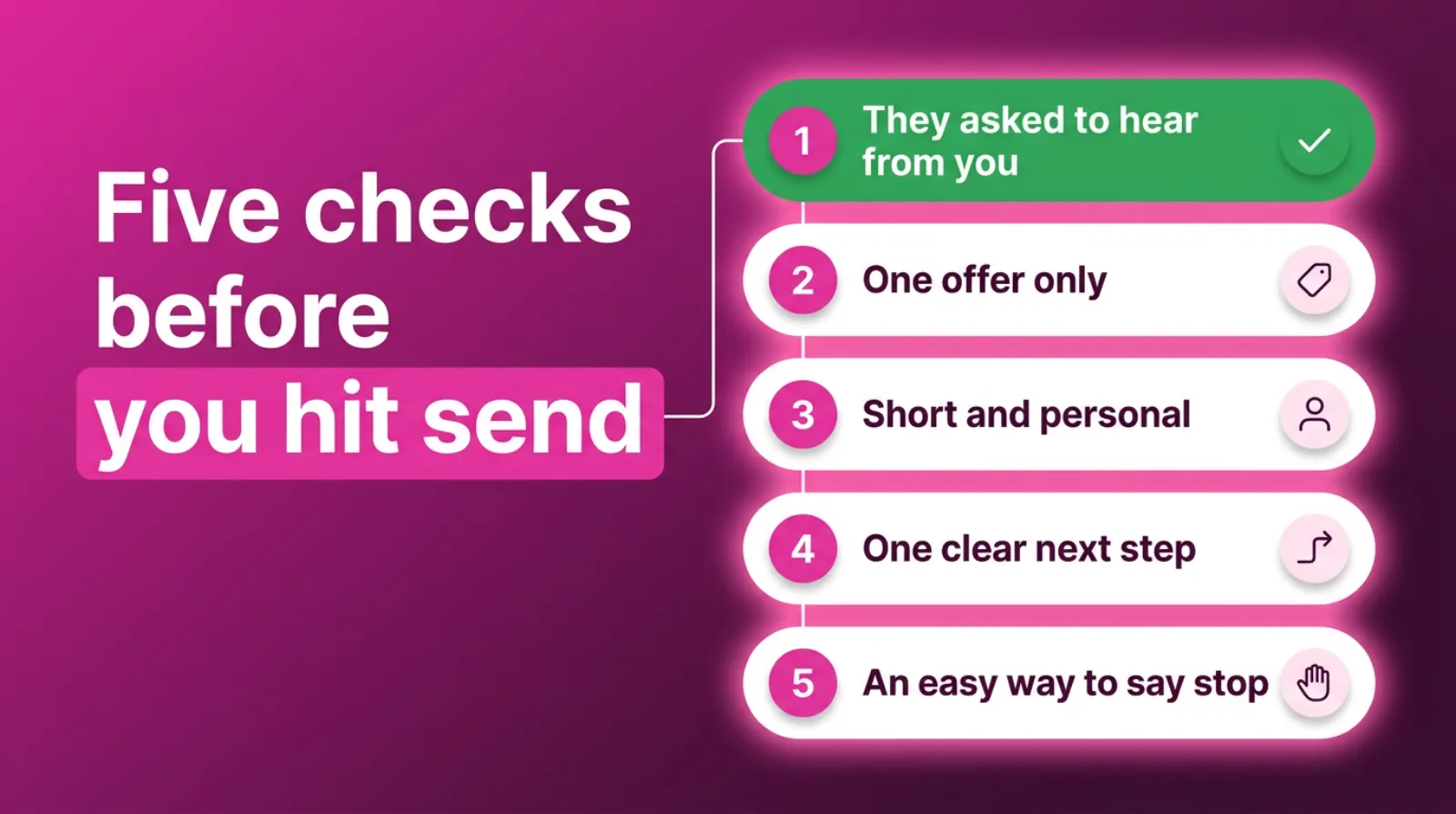
The first check matters most, and it's the one with legal weight behind it.
Is It Legal To Send Marketing Messages On WhatsApp In The UK?
Yes, if the person agreed to hear from you or is an existing customer who had a clear chance to opt out. The ICO treats direct messages in the same way as emails and texts, so the same marketing rules apply. Never add numbers from a bought list or a directory.
As of November 2026, the ICO's guidance on electronic mail marketing says its rules cover "emails, texts, picture messages, video messages, voicemails, direct messages via social media or any similar message that is stored electronically".
WhatsApp is not named, but a WhatsApp marketing message fits that description, so we treat it the same way.
In plain English, you can send marketing on WhatsApp in two cases.
The first is consent. The person clearly said yes to hearing from you on WhatsApp. For example, they ticked a box or replied "yes please" to your question.
The second is called the soft opt-in.
They bought from you, or asked about buying, a similar service in the past.
You gave them a clear chance to say no when you took their number. And you give them that chance again in every message.
In practice, that means ending every broadcast with a simple line. "Reply STOP and we will not send these again". Then honour it straight away. No arguments.
Replies to a customer's own questions are not marketing.
If someone messages you for a quote, you can reply, send the quote and chase it. The rules bite when you send offers they didn't ask for.
A note on the law.
This is general guidance, not legal advice. The ICO's own page says the guidance is under review after the Data (Use and Access) Act, so check it if you're unsure.
Why Aren't My WhatsApp Broadcasts Being Delivered?
Almost always because the customer has not saved your number. Broadcasts only reach people who have you in their contacts. The other common reasons are a wrong number format or a customer who blocked you. Sometimes WhatsApp has limited the number after too many reports.
Here are the fixes.
- Ask customers to save your number at the end of every job, and tell them why.
- Save their number with the country code, such as +44, and no leading zero.
- Look at the ticks. One grey tick means sent but not delivered. Two grey ticks mean delivered. Two blue ticks mean read.
- Cut lists to people who've bought in the last two years. Old contacts are more likely to report you.
- Slow down. If you send too often, people block you, and enough blocks can get your number restricted.
There is a simple test too.
Send your next broadcast to a list of ten regulars first. If only four of them get two ticks, you've found your problem early, before you send the same message to two hundred people and wonder why nobody replied.
How Do I Know If WhatsApp Is Bringing In Work?
Use labels and a simple tally. Tag every new chat with where it came from, then count how many became paid jobs each month. Add a WhatsApp link with a tracking tag to your website so Google Analytics records the clicks.
Most owners guess at this. Don't. A quick count beats a guess. Always count.
Start with labels.
When a new chat comes in, ask "How did you find us?" and label the answer: Google, referral, van, Status or broadcast.
At the end of the month, filter by each label and count the paid jobs.
Then look at your broadcasts.
After each one, count the replies and the bookings over the next seven days.
If a broadcast to 150 people brings in four jobs at £200 each, that is £800 from a free message.
On your website, Google Analytics can track clicks on the WhatsApp button.
Ask whoever built your site to set it up as a key event. Then you can see which pages send people to WhatsApp.
Finally, keep an eye on the payment side.
Your payment app shows every link that was paid and when. If links sent within an hour of finishing get paid faster than invoices, you have your answer. Keep going.
What Does This Look Like For Different Businesses?
The tools are the same, but each business uses them differently. Here are four examples to show the idea. They're illustrations, not client results.
A plumber uses the greeting message to ask for a photo of the problem and a postcode, so every quote can go out within the hour without a single phone call.
Quotes go out with a deposit link. A broadcast list of boiler customers gets a service reminder every September.
A hair salon posts two finished styles to Status each week, which keeps regulars thinking about their next appointment without the salon ever sending them a sales message.
A list of regulars gets cancellation slots first. Deposits for colour appointments go out as links to cut down no-shows.
A dog groomer saves every client with the dog's name in the contact.
Status shows a fresh groom most days. A broadcast before Christmas fills the last slots of the year.
A café runs a channel for its daily specials and a broadcast list for people who order cakes.
Cake orders over £30 need a deposit, sent as a link in the chat.
Notice the pattern here. Status keeps you visible, broadcast lists fill gaps and payment links turn yes into paid.
When Is WhatsApp The Wrong Tool?
WhatsApp is not the answer to everything. It is the wrong tool if you need a written record that a client signed, such as a contract or terms of business. Send those by email or e-signature and use WhatsApp to point to them.
It is also wrong for sensitive details. Don't ask for full card numbers or bank logins in a chat, ever. That's what payment links are for. Use them.
It can be the wrong tool for you personally, too.
If customers message at 10pm and you feel you must reply straight away, you'll burn out within a few months and start to resent the very app that was meant to help. Use the away message. Set your hours and stick to them.
And it's not a way to find brand new customers.
WhatsApp works best with people who already know you. To reach new people, you still need Google, word of mouth and a strong local profile.
Frequently asked questions
Should I use a WhatsApp group or a broadcast list for my customers?
Use a broadcast list.
In a group, every member can see the others' names and numbers, and every reply goes to everyone. A broadcast list reaches the same people privately, one to one.
Can I use WhatsApp Business and normal WhatsApp on the same phone?
Yes, as long as each app uses a different phone number. A dual-SIM phone makes this easy, with your personal number on WhatsApp and your work number on WhatsApp Business.
Can I move my existing number to WhatsApp Business?
Yes. When you register the Business app with a number already on WhatsApp, it offers to move your chat history across. Back up your chats first, just in case.
How often should a business post on WhatsApp Status?
Two or three times a week works well for most local firms. That is enough to stay in view without crowding people's screens. Post real photos of real work.
Do customers have to save my number to get my messages?
For broadcast lists and Status, yes. People who haven't saved your number won't see your broadcasts, and Status also needs you to have saved theirs. Normal one-to-one replies reach them either way.
Does WhatsApp Business cost anything?
The app itself is free.
You only pay if you move to the WhatsApp Business Platform, which charges per message. Any payment app you use for links charges its own fee.
Keep Reading
If you're building up the way your local business wins and keeps customers, these posts are worth a read next.
- How Do I Promote My Business When I Have No Budget And A Van?
- How To Grow A Local Business That Only Serves One Town
- How To Get Your Business On Google Without Paying Google
- Why Your Email Marketing Isn’t Working (And How to Fix It)
- Bark, Checkatrade Or Your Own Ads? Where To Get Leads
We picked these because WhatsApp keeps customers in touch, and these cover how to win them in the first place.
Sources
The facts and prices in this post come from the pages below. We checked them on 13 November 2026. Prices and features change, so check the latest version before you rely on them.
- Electronic mail marketing. https://ico.org.uk/for-organisations/direct-marketing-and-privacy-and-electronic-communications/guide-to-pecr/electronic-and-telephone-marketing/electronic-mail-marketing/
- From apps to AI search: how the UK goes online in 2025
- WhatsApp Business App Features
- Pricing & Fees. https://stripe.com/gb/pricing
- SumUp Pricing: Fees, Charges & Rates for Card Payments
So, Is Your Phone Working As Hard As You Are?
You do not need new software or a big budget to make WhatsApp work for your business. You need an hour to set it up and the habit of using it well.
Fill in the profile.
Write a greeting that asks the right question. Ask every customer to save your number.
Post real work to Status a few times a week. Send a payment link the moment a job is done.
Do that for three months, then count the jobs. Most owners are surprised by how much of that work comes from people who already knew them and simply needed a nudge at the right time.
If you'd like a hand building the rest of your local marketing around it, book a call. We'll look at how your Google profile, your website and your ads can feed more people into that chat.

Written by Uzair Kharawala
Partner at SF Digital Studios, a Google Premier Partner agency. Uzair has been helping businesses grow with Google Ads for almost 15 years and teaches it every week on YouTube.
Get our best Google Ads tips by email
New articles and videos, straight to your inbox. Unsubscribe any time.