
Running a business today means juggling a lot, especially when it comes to spending money on marketing. If you’re using Google Ads, you already know it can drive traffic and leads. But are you getting the full story from your reports?
Here’s the truth: standard Google Ads reports often miss the mark when it comes to showing what matters most to your specific business goals. That’s where Custom Columns step in.
They sound technical, but they’re very simple to use—and they can give you the kind of insight that helps make better decisions and stretch your ad budget further. Whether you’re a one-person operation or part of a small marketing team, Custom Columns can put you in control of your data.
What Are Google Ads Custom Columns?
Imagine you’re looking at your Google Ads dashboard. You see numbers like clicks, impressions, and conversions—but maybe you’re wondering which conversions brought in money, or whether your ad spend yesterday was out of the ordinary.
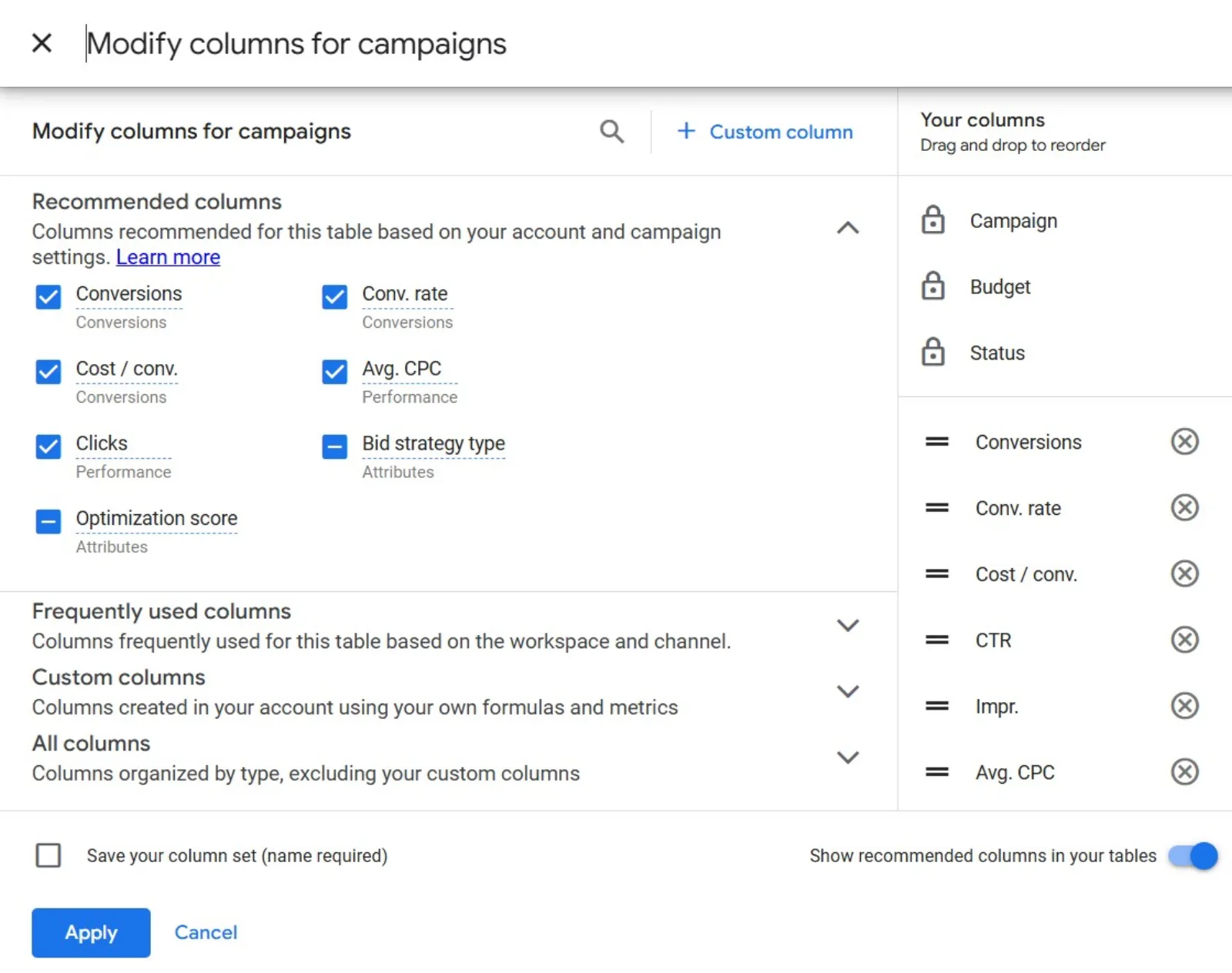
Custom Columns allow you to create your view of this data. You can build columns that focus on the metrics that matter to your business. Whether it’s cost per lead, conversion breakdowns, or spend anomalies, Custom Columns can help you track it all without relying only on standard reports.
Why Custom Columns Matter for Small to Mid-Sized Businesses
When you’re not working with a massive ad budget, every cent counts. Custom Columns give SMBs the edge by helping answer questions like:
- Are my leads turning into real sales?
- Is my cost per conversion creeping up this week?
- Is someone bidding on my brand terms?
- Did I overspend yesterday without realising it?
Let’s break this down with some clear benefits.
1. Understand Different Types of Conversions
Not all conversions are created equal.
You might be tracking multiple actions as conversions: form fills, quote requests, or completed purchases. Using Custom Columns, you can separate those and see which campaigns are delivering what kind of results.
This means you’ll know whether a campaign is bringing in just leads, or high-value leads that buy. It’s a simple way to move beyond surface-level reporting and understand what success truly looks like for your business.
2. Spot Cost Trends in Real-Time
With a little setup, you can build columns that show:
- Yesterday’s cost per acquisition (CPA)
- 7-day average CPA
- 30-day trend lines
This helps you react quickly if something seems off. If yesterday’s CPA was much higher than usual, maybe it’s time to check your bids, change your targeting, or pause a poor-performing ad. You’ll no longer be guessing when costs spike—you’ll see it.
3. Watch the Competitive Landscape
Competition in Google Ads is always changing. If your click-through rate (CTR) suddenly drops and your cost-per-click (CPC) shoots up, that’s usually a sign that something’s up.
With a custom column that compares this week’s CTR to last week’s, you’ll be able to catch these changes right away. Then, you can dig into Auction Insights to see who’s creeping in—or maybe refresh your ad copy to stand out again.
This is especially useful if you’re protecting brand terms or running tight-margin campaigns.
4. Catch Overspending Early
We all know Google sometimes pushes your daily budget a little further than expected. With a simple Custom Column, you can compare yesterday’s spend to your 7-day average.
If spending is way above the norm and there’s no matching performance boost, you’ll know to dig in and make adjustments. It’s a proactive way to manage your budget before a small problem turns into a big bill.
Custom Column Ideas to Try Today
Let’s look at some practical setups. These aren’t just helpful—they’re easy to build and immediately useful:
- Conversion Type Breakdown: Set up one column for cost per lead and another for cost per sale. This gives a clearer picture of which campaigns are driving paying customers.
- CPA Weekly Comparison: Create two columns: one for yesterday’s CPA and one for your 7-day average. You’ll spot changes quickly, without needing to dig through reports.
- CTR Change Tracker: Show the % change in CTR compared to last week. This quick view can alert you to ad fatigue, poor targeting, or rising competition.
- Daily Spend vs. Average: A simple column that displays yesterday’s spend as a percentage of your 7-day average spend. If it’s way above 100%, take a look.
These columns don’t just look nice—they work. They help you save money, adjust faster, and keep your campaigns healthy.
Getting Started: It’s Easier Than You Think
Creating a Custom Column might sound complicated, but it’s just a few clicks:
Go to your Campaigns or Ad Groups view.
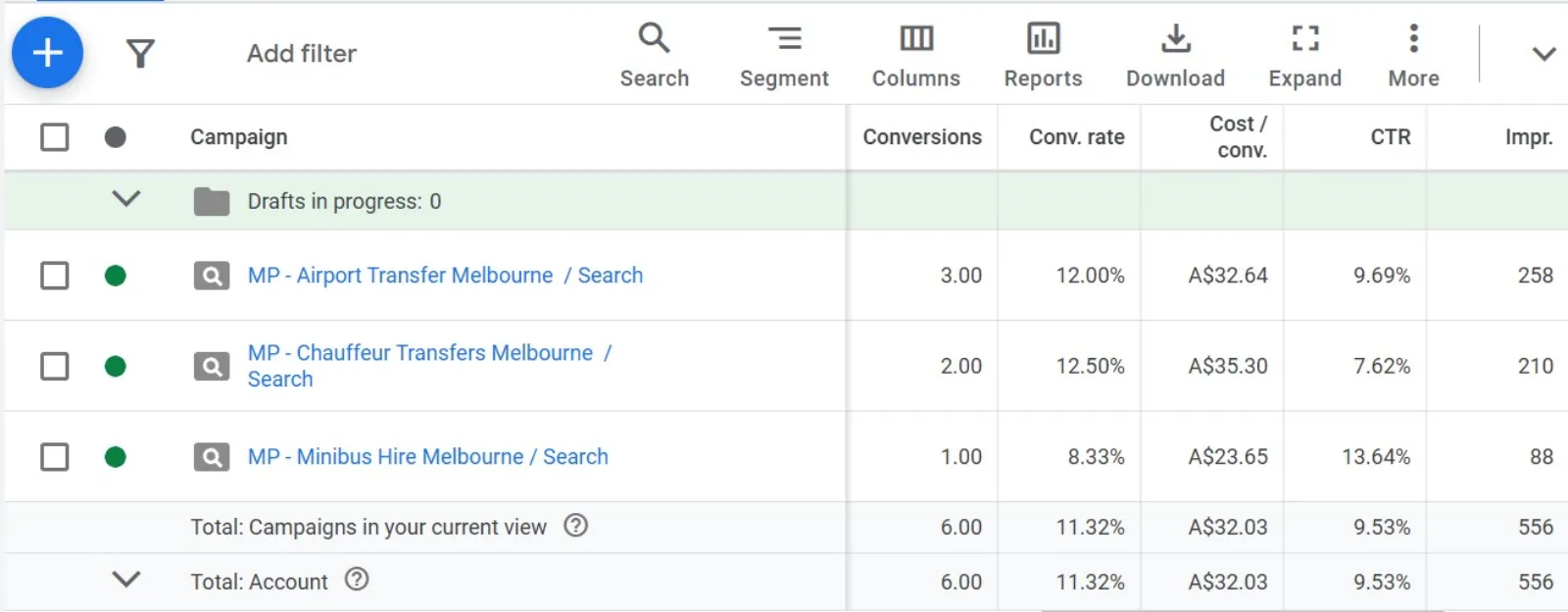
Click on “Columns” in the toolbar.
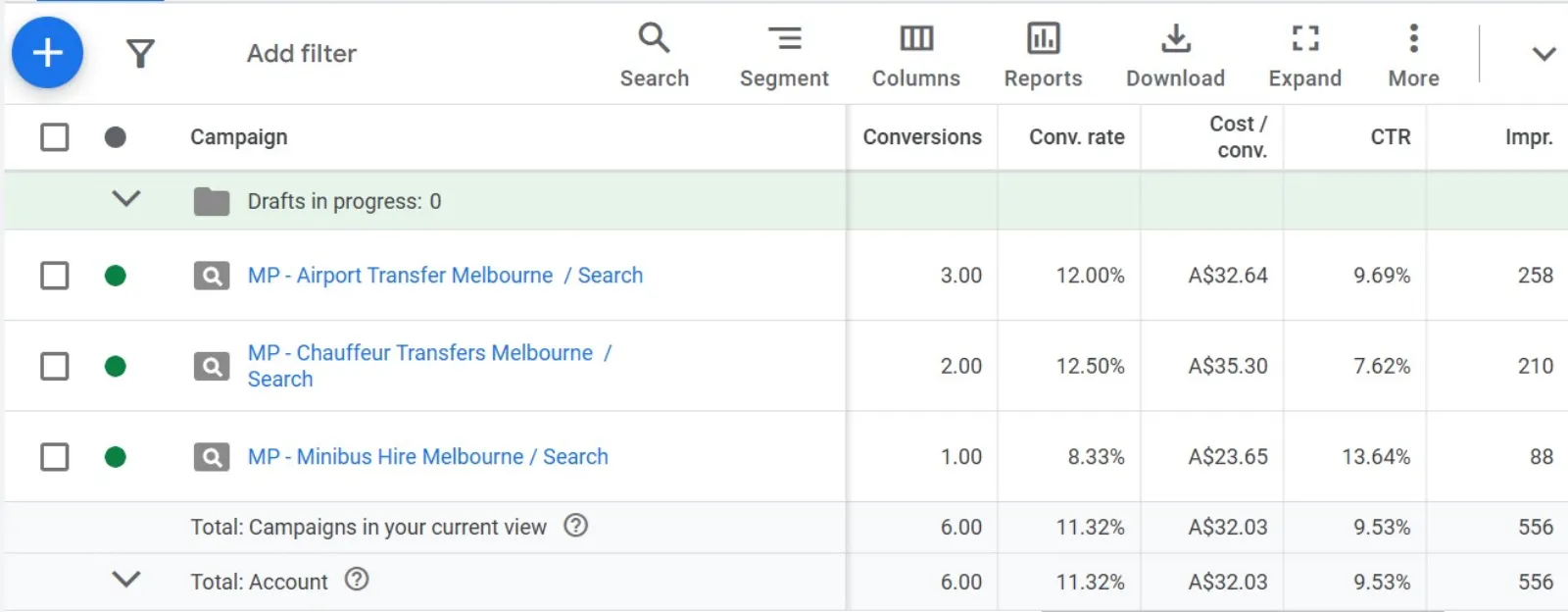
Select “Modify Columns” and scroll down to find “Custom Columns.”
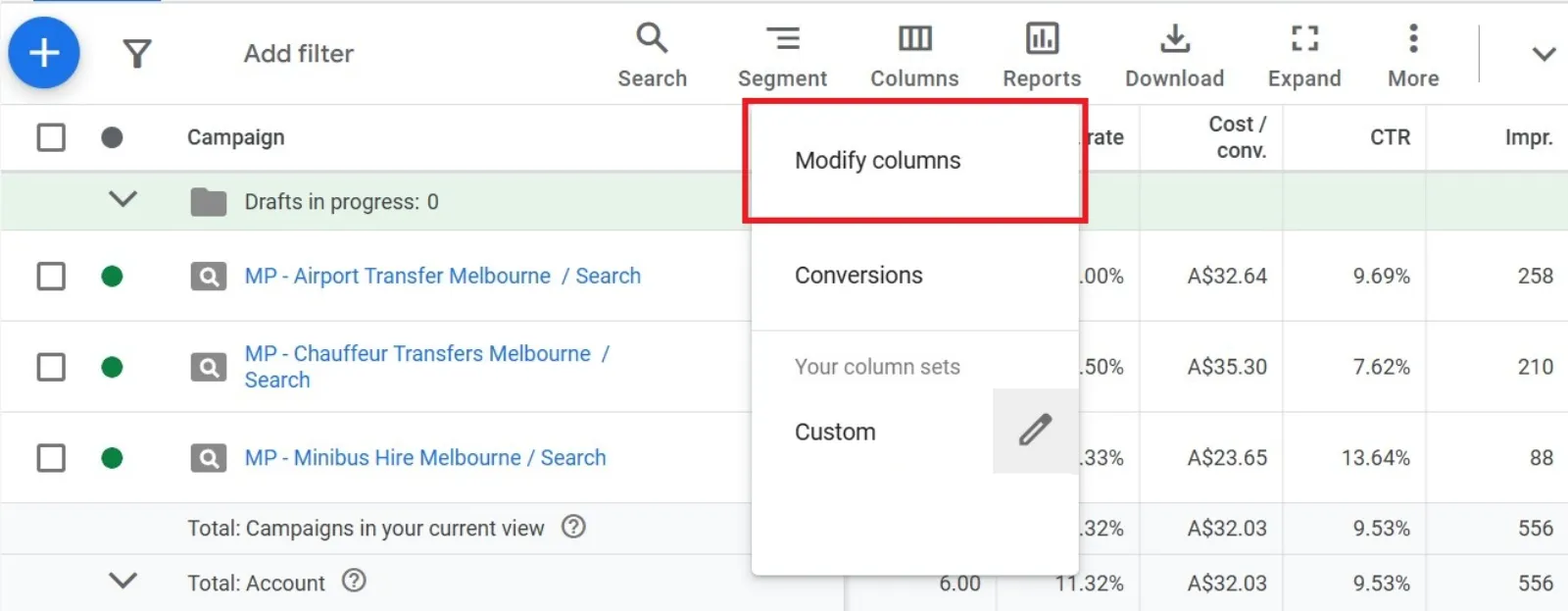
Click “+ Custom Column” and choose your metrics.
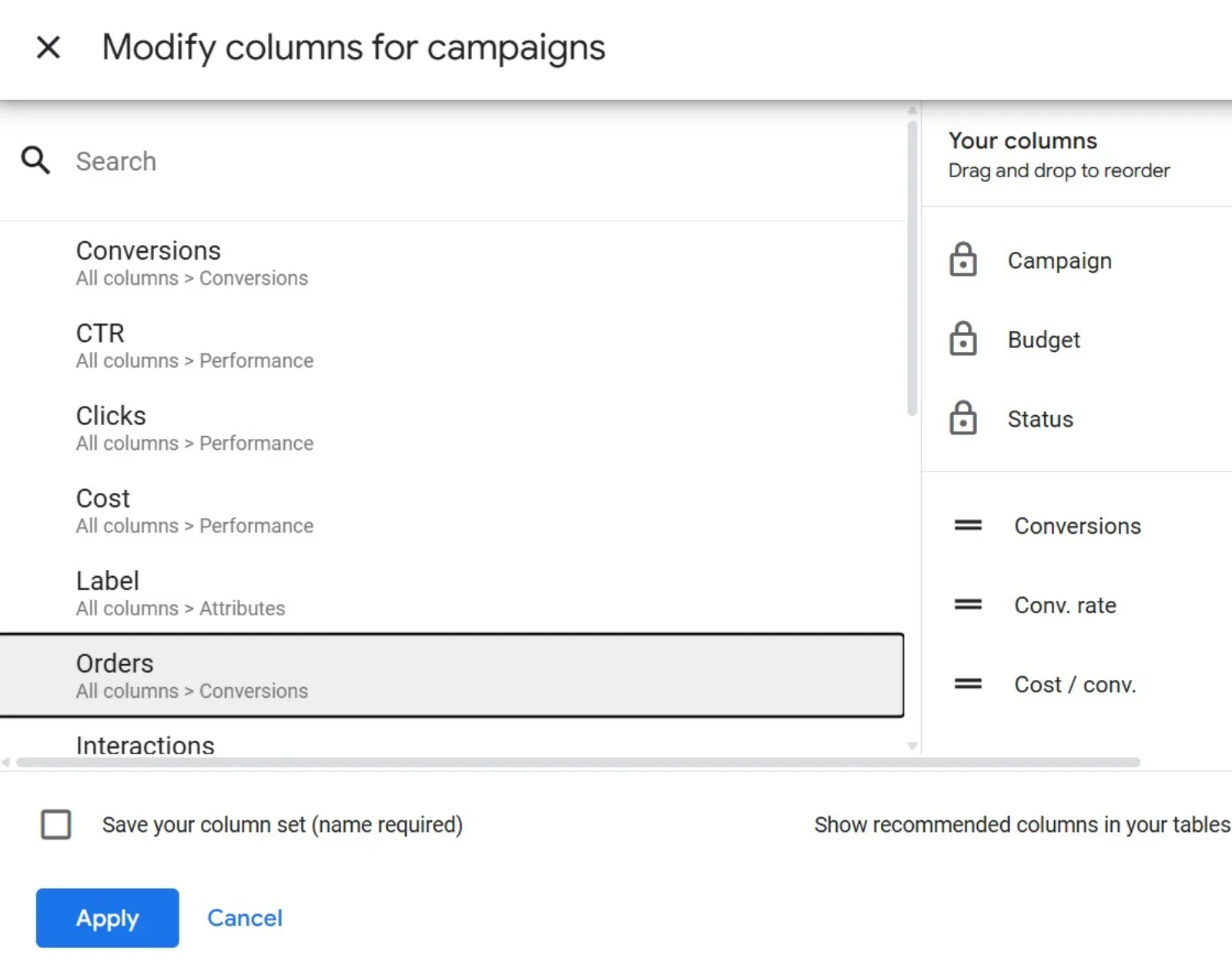
(Optional) Use formulas to combine data in a way that suits your needs.
That’s it! Once set up, your new column appears alongside all your standard metrics. You can even save the view and come back to it later.
Why This Matters More Than Ever
Advertising today is full of automation—smart bidding, AI-generated ads, and auto-applied recommendations. These can be helpful, but they also mean you have less visibility and control.
Custom Columns give that power back to you.
They don’t just show you numbers—they answer real business questions. And when you’re running a smaller business, every data-driven decision makes a difference. From budget allocation to creative tweaks, this tool helps you make smarter moves faster.
Final Thoughts: Take Control of Your Google Ads Data
If you’re not using Custom Columns yet, now’s the time. It’s a simple step that can unlock deeper insights and real clarity.
Whether you’re tracking conversion quality, monitoring cost trends, or keeping your budget in check, Custom Columns are like your own custom dashboard—built to show what you care about.
So, don’t let the default settings limit your understanding. Customise your view, get ahead of problems, and make every ad dollar work a little harder.

Written by Uzair Kharawala
Founder of SF Digital Studios, a Google Premier Partner agency. Uzair has been helping businesses grow with Google Ads since 2002 and teaches it every week on YouTube.
Get our best Google Ads tips by email
New articles and videos, straight to your inbox. Unsubscribe any time.