
You’ve built your Google Ads campaign. You’ve done the research, crafted the perfect headlines, and written a description that you just know will get clicks. Everything is ready. You hit ‘enable,’ and you wait for the leads to start pouring in.
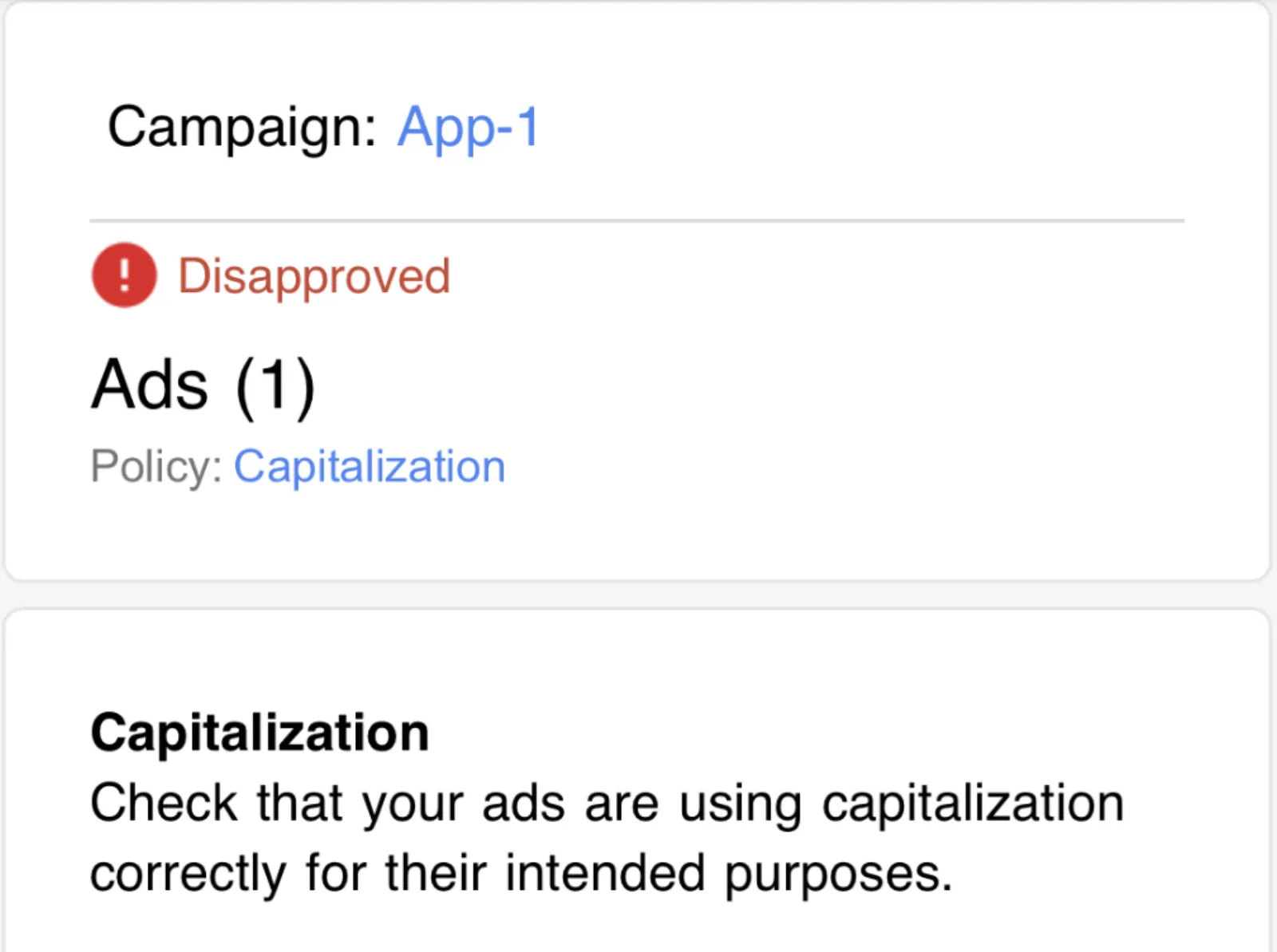
But a day, maybe two, goes by, and nothing happens. You check your account, and there it is. A small, but devastating message: “Disapproved.”
You’re scratching your head, trying to figure out what went wrong. Did you break a rule about trademarks? Is your landing page not working? You scan the message, and it says something about “Capitalisation.”
Capitalisation? How could a few capital letters stop your entire campaign? It’s a simple mistake, but it costs thousands of marketers thousands of dollars every year.
Here’s why Google is so picky about it and how to make sure it never happens to you again.
The Big Problem with All Caps
Think about your email inbox. When you see an email with a subject line that’s all in capital letters, what’s your first thought? It probably feels like someone is yelling at you. It feels unprofessional, maybe even a little bit like spam.
Google’s policy on capitalisation is built on the same idea. They want the ads that appear on their search results page to look professional and trustworthy. Ads that use excessive capitalisation—like “BUY NOW! FREE SHIPPING!”—go against this. They look like spam, and they can hurt the user experience.
For Google, it’s about maintaining the quality of its platform. They want users to trust the ads they see, and that means the ads have to follow some basic rules of grammar and style. If an ad looks “gimmicky” or like it’s trying too hard to grab attention, it gets flagged.
This rule isn’t just about a single word. It can be about a whole headline or description. You can’t just throw in a capital word here and there for emphasis. Google’s automated systems are designed to spot this kind of thing, and they will disapprove your ad without a second thought.
The Two Capitalisation Rules to Live By
So, what are the rules? It’s pretty straightforward, but a lot of people get it wrong.
Rule 1: Use Title Case or Sentence Case
There are two main ways to capitalise your ad text that are generally acceptable.
- Title Case: Capitalise the first letter of each important word. This is a very common style for ad headlines and often leads to higher click-through rates.
- Correct: “Shop Our Latest Summer Collection”
- Incorrect: “Shop our latest summer collection”
- Sentence Case: Capitalise only the first letter of the first word in a sentence, just like you would in a regular email or document.
- Correct: “We offer free shipping on all orders”
- Incorrect: “We Offer Free Shipping On All Orders”
Both of these are fine. The key is consistency. Don’t mix and match. Choose one style and stick with it throughout your ad copy.
Rule 2: The Exception to the Rules
There are a few times when it’s okay to use capitalisation that doesn’t follow the main rules, but these are very specific.
- Brand Names: If your brand name is meant to be in all caps, that’s usually okay. For example, if your company is called “ACME,” you can write “ACME Products.” However, it’s a good idea to make sure this is the consistent branding on your website as well.
- Acronyms: Standard acronyms like “ASAP” or “NATO” are allowed.
- Coupon Codes: A coupon code that is meant to be in all caps, like “SAVEBIG,” is typically permitted.
The important thing to remember with these exceptions is that you might have to appeal the disapproval. Google’s automated system might flag it, and you’ll have to tell them, “Hey, this is our brand name, it’s supposed to be like this.”
What to Do When an Ad is Disapproved
Don’t panic. Getting disapproval isn’t the end of the world. Here’s your simple action plan:
- Check the Status: In your Google Ads account, go to the ‘Ads & assets’ page. Look for the ad that’s disapproved and hover over the “Status” column. It should give you a reason, which in this case will be “Capitalisation.”
- Edit the Ad: The fastest and easiest way to fix this is to edit the ad directly. Change the headline and description to use proper title case or sentence case. If you have any all-caps words that you think are exceptions (like your brand name), make sure they follow Google’s specific guidelines.
- Save and Wait: Once you save your changes, Google will automatically review your ad again. This usually happens pretty quickly, and if you’ve fixed the issue, your ad will be approved and start running.
You can also appeal the decision if you believe the ad was disapproved in error. But for simple capitalisation issues, it’s often faster to just edit the ad and resubmit it.
The Real Cost of This “Tiny” Mistake
When your ad is disapproved, it stops showing. The money you’ve set aside for your campaign sits there, not being spent. Every hour, every day your ad is not running, you’re missing out on potential clicks, leads, and sales.
For a small business, a single disapproved ad might not feel like a big deal, but when you consider the cost of lost business over a week or even just a few days, it adds up. If you’re a big company with multiple campaigns running, the impact is multiplied, potentially costing you thousands or even tens of thousands of dollars in lost revenue.
Beyond the direct cost, repeated policy violations can lead to more serious consequences, including having your account suspended. This is a far bigger problem and can be very difficult to fix.
The message is clear: a little bit of attention to detail goes a long way. Paying attention to something as small as capitalisation can be the difference between a campaign that succeeds and one that’s a total failure. It’s not a creative roadblock; it’s just a simple rule that helps you play by Google’s rules and get your message in front of the right people.

Written by Uzair Kharawala
Founder of SF Digital Studios, a Google Premier Partner agency. Uzair has been helping businesses grow with Google Ads since 2002 and teaches it every week on YouTube.
Get our best Google Ads tips by email
New articles and videos, straight to your inbox. Unsubscribe any time.