

For twenty years, measuring advertising worked one way. A tag sat on your website, it watched what visitors did, and it reported back.
That method is being dismantled. Not all at once, and not by any single decision, but steadily. Cookie consent removed a share of it. Browser restrictions removed more. Ad blockers take another slice.

Get Found, Get Chosen, Get Your Time Back
A free one-day marketing seminar in Milton Keynes · 10 November 2026
Google's answer is to stop relying on the browser and start asking you for the data directly.
Get your free Marketing Action PlanNot sure where to start? Answer a few questions and get your plan in about a minute. No email needed.
Get my plan →Two products do that, and almost every article on the subject treats them as the same thing. They are not, and confusing them is genuinely expensive.
Google Ads Data Manager is free, it is point-and-click, and a competent person can set it up in an afternoon.
Server-side tagging is an infrastructure project. Managed services run from a few hundred pounds a month. A do-it-yourself build can reach five figures in the first year.
Most small businesses should do the first and leave the second alone. This post explains why, and gives you the threshold at which that answer changes.
Why Browser Tracking Is Failing
It is worth understanding the cause, because it explains why this is not a passing inconvenience.
The old method depended on a small piece of code in the visitor's browser observing behaviour and sending it to Google. That code needs three things: permission to run, permission to store an identifier, and an unblocked route back to Google.
All three have weakened.
Consent rules mean a share of visitors decline before the tag does anything. Browsers have introduced restrictions that shorten or block the identifiers tracking relies on. Ad blockers stop the requests outright for a meaningful slice of traffic.
None of this is reversing. Each element has moved in the same direction for years, and no regulator or browser maker has signalled otherwise.
So the ground has shifted. Data collected in the browser is now a partial account of what happened, and the size of the gap depends on your audience rather than your setup. A B2B audience of technical buyers blocks far more than a general consumer audience.
The response is to send what you already know, from somewhere the browser cannot interfere with. That is the thinking behind both products, and it is the only sentence they genuinely share.
What Google Ads Data Manager Actually Is
Data Manager is an import tool with a proper interface. That is the whole idea, and it is more useful than it sounds.
Before it existed, connecting your own data to Google Ads meant several separate jobs in separate places. Uploading a customer list was one process. Setting up enhanced conversions was another. Importing offline conversions from your CRM was a third. Each had its own formatting rules and its own way of failing quietly.
Data Manager puts them in one place. You connect a data source once, then use it across multiple Google destinations rather than repeating the work for each.
It handles four things that matter to a small business.
Customer match, which is uploading a list of your customers so you can target them, exclude them, or find people similar to them.
Enhanced conversions, which is sending hashed contact details alongside a conversion so Google can match conversions it could not otherwise observe.
Offline conversion imports, which is telling Google which enquiries turned into actual customers, and what they were worth.
CRM audiences, which is building targeting from your own records rather than from Google's guesses.
It reached general availability in April 2026. It offers native connectors for common sources including BigQuery, CRM systems and customer data platforms, and you can upload a file directly if you would rather.
The important part for a small business is what it does not require. No developer. No server. No cloud account. No monthly cost.
The Two Products, Side By Side
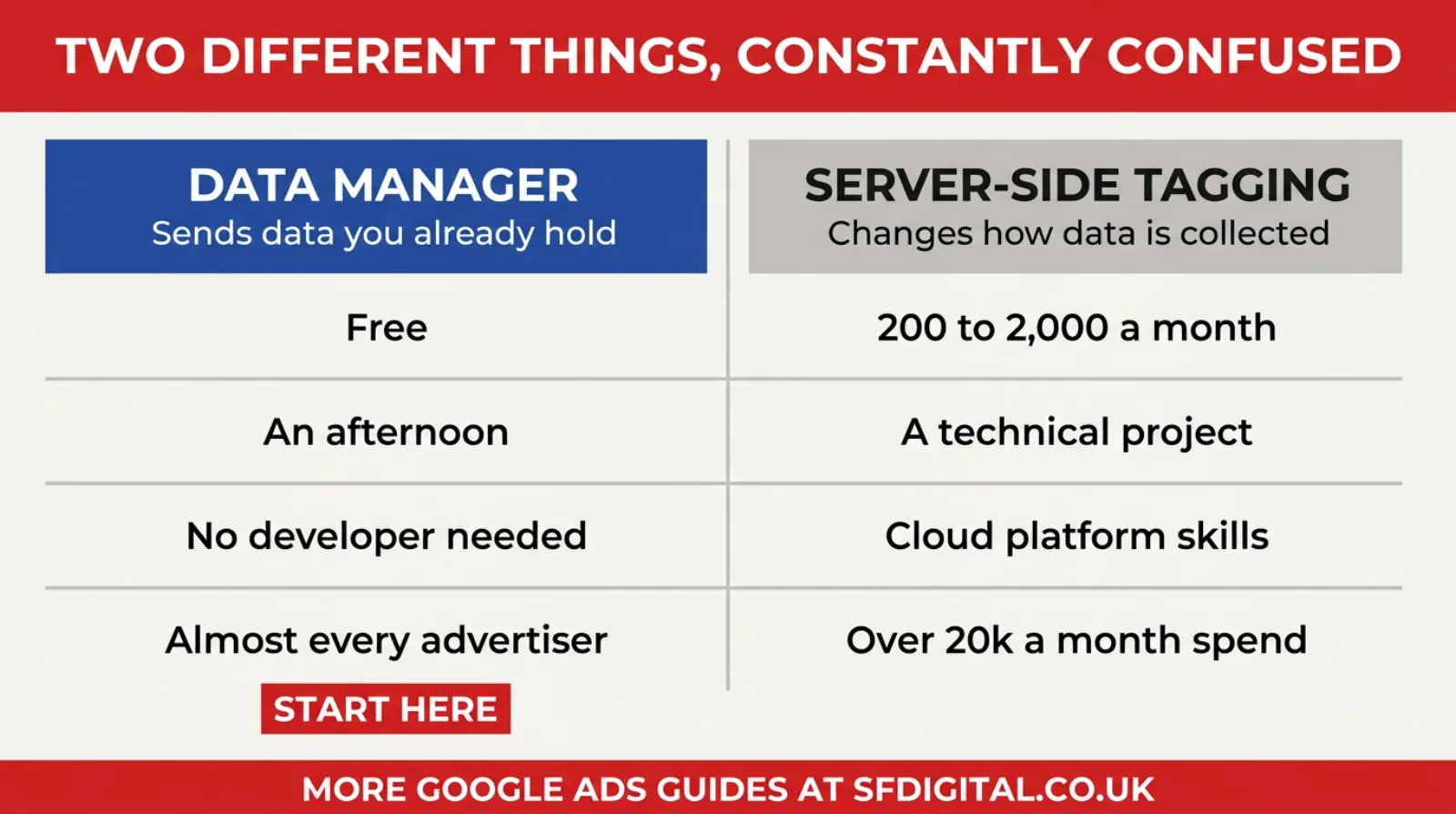
The distinction that matters is on the left: one sends data you already hold, the other changes how data is collected in the first place.
Estimating Your Own Data Gap
Before spending anything, it is worth knowing how big your problem actually is, because the answer varies enormously by audience and almost nobody measures it.
Three rough checks get you close enough to decide.
Compare analytics sessions against server logs. Your hosting control panel or CDN reports raw visits. Your analytics reports sessions. The difference between them is roughly your blocked and unconsented traffic. A gap of ten percent is unremarkable. A gap of forty percent tells you a lot of your audience is invisible.
Check your consent acceptance rate. Most cookie banner platforms report it, and most people have never looked. If seventy percent accept, three in ten visitors are already partly dark before any other factor.
Compare Google Ads conversions against your own enquiry count for a full month. Not GA4 against Google Ads, which compares two estimates. Your inbox and call log against the platform. That difference is the gap that matters commercially.
Now put those against your audience. Technical buyers, developers, privacy-conscious B2B audiences and younger consumers block at far higher rates than a general local audience. A plumber advertising to homeowners in Bedfordshire has a much smaller problem than a software company selling to engineers.
If all three checks come back tight, your data is in reasonable shape and the expensive option is not urgent. If they come back wide, you have a real measurement problem, and the case for investment gets stronger regardless of spend level.
That is twenty minutes of work and it converts a vague worry into a number.
What Server-Side Tagging Actually Is
This is the one that gets oversold, so it deserves a plain explanation.
Normally, tags run in the visitor's browser and send data straight to Google, Meta and anyone else. Server-side tagging puts a server of yours in the middle. The browser sends data to your server, and your server decides what to forward.
The benefits are real. Ad blockers struggle to block requests to your own domain, so you recover data you were losing. Pages load faster because the browser is doing less. You gain genuine control over what leaves your site, which matters for privacy compliance. And the data is more resilient to browser restrictions.
Those are not marketing claims. They hold up.
The costs are also real, and are stated far less often.
A managed service typically runs somewhere between roughly 200 and 2,000 pounds a month depending on your traffic. Building it yourself commonly costs somewhere between 8,000 and 25,000 pounds across the first year once you account for the build and the maintenance. Google Cloud's free tier does cover genuinely low-traffic sites, usually under about a million server-container requests a month, so hosting is not always the expensive part.
The bigger barrier is complexity. It requires understanding cloud platforms, configuring a server container, mapping every tag, and maintaining it when something changes. This is not a task for someone who is comfortable in Tag Manager. It is a task for someone who is comfortable in Google Cloud.
What Enhanced Conversions Actually Do
This is the single highest-return item in this article, so it deserves more than a mention.
When someone fills in your form, they give you details. An email address, usually a phone number. Enhanced conversions takes those details, hashes them, which means converting them into an irreversible scrambled string, and sends that alongside the conversion.
The raw values never leave your site. What Google receives is the scrambled version, which it compares against the scrambled version of signed-in Google accounts. Where they match, a conversion that browser tracking missed gets recovered.
Why this matters more than it sounds: it works when cookies do not. Someone who declined your banner, or blocked your tags, or switched device between clicking and enquiring, can still be matched this way, because the match is on the details they typed rather than on an identifier the browser stored.
Setup is a Google Tag Manager job. It is genuinely an afternoon for someone comfortable in Tag Manager, and it is well documented. It does not need a server, a cloud account or a monthly fee.
Two practical notes. It only works where people actually give you details, so it helps with forms and calls rather than anonymous browsing. And your privacy policy should say you do this, which is a paragraph, not a project.
If you do nothing else from this article, do this. It is free, it is quick, and it recovers more measurement per hour of effort than anything else available to a small advertiser.
So Which One Do You Need
Here is the honest answer, which very little of the available advice gives you.
If you spend under about 5,000 pounds a month on advertising, do Data Manager and skip server-side tagging. The payback period on the second is long at that spend, and the money buys more elsewhere. The recovered data is real but it is a percentage improvement on a modest base.
If you spend between 5,000 and 20,000 a month, do Data Manager first, then review server-side tagging once the first is working properly. Many accounts in this range find Data Manager closes enough of the gap that the second stops feeling urgent.
If you spend more than 20,000 a month, or you sell to a technical audience with high ad-block rates, server-side tagging is worth pricing properly. At that spend, a recovery of even a few percent covers the cost.
Two situations change the answer regardless of spend. If you operate somewhere heavily regulated and need real control over what data leaves your site, server-side tagging is a compliance tool as much as a measurement one. And if your ad blocker rate is unusually high, which you can estimate by comparing your analytics sessions against your server logs, the recovery is larger than average.
The sequence matters more than the choice. Data Manager first, always. It is free, it is quick, and it closes the largest part of the gap for the smallest effort. Deciding about server-side tagging before you have done that is deciding without evidence.
A Worked Example
Numbers make this concrete, so here is the shape of it. These figures are illustrative rather than from a real account.
A commercial cleaning company spends 2,000 pounds a month on Google Ads. Google reports 40 conversions. The owner's inbox shows 26 genuine enquiries.
That mismatch is the whole problem in one line. Google is reporting 54% more conversions than the business received enquiries, which usually means conversion actions are counting things that are not enquiries, and possibly that modelling is filling in optimistically.
Cost per reported conversion looks like 50 pounds. Cost per actual enquiry is 77 pounds. The bidding is optimising towards the first number.
 LIVE
LIVELive every Tuesday at 2pm UK. Bring your marketing questions.
Get your Google, local SEO and AI questions answered live.
Now the useful part. Of those 26 enquiries, 6 became customers, worth an average of 3,000 pounds a year each.
Under the current setup, Google knows nothing about those 6. Every form fill looks identical to it, so it optimises for volume of form fills, which is why it keeps finding more of the cheap ones.
Fixing the conversion actions so they only count real enquiries brings the reported number closer to 26. Then offline conversion imports, through Data Manager, tell Google which 6 of those 26 became customers and what they were worth.
At that point the bidding is chasing customers rather than form submissions. That is a different optimisation target, and it typically changes which searches the account wins.
None of that required a server, a developer or a monthly fee. It required knowing which 6 enquiries became customers, which is the spreadsheet, and then sending it, which is Data Manager.
The company in this example does not need server-side tagging. It has a data quality problem, not a data collection problem, and those are fixed in different places.
What Data Manager Cannot Do
Being fair about the limitations, because none of the vendor content is.
Imports run on a daily schedule. If your business needs conversion data inside Google within minutes rather than by tomorrow, this is not the tool. Most SMEs do not need that, but some do.
It offers less customisation than the API. If you have an unusual data shape or a specific transformation requirement, you may still need a developer, and some larger advertisers run the API alongside Data Manager for their time-critical data.
Permissions and file formatting cause most setup problems. Getting the right access on both the Google side and your CRM side is the step people get stuck on, and column formatting for uploaded files is fussier than it looks.
It does not fix collection. This is the important one. Data Manager sends data you already hold. If you are not recording which enquiries became customers, there is nothing to send, and no tool solves that for you.
That last point is the real prerequisite, and it is not technical.
The Thing That Actually Blocks Most Businesses
Every conversation about this eventually arrives at the same place, and it is never the technology.
Both products depend on you knowing what happened after the click. Which enquiries were any good. Which turned into customers. What those customers were worth.
Most small businesses do not record that in a retrievable way. The information exists, in an inbox, a notebook, someone's memory, but not in a form you can export.
So the honest first step for most readers is not a tracking project. It is a spreadsheet.
Date of enquiry. Where they came from. What they wanted. Did it become a job. What was it worth.
Five columns. That is enough to start feeding Google better information than it currently has, and it is enough to tell you whether your advertising works regardless of what any platform reports.
There is no shortcut past this. A business that cannot say which enquiries turned into customers cannot send that back to Google, and every clever tool in this article is downstream of it.
How To Get Started This Week
A sensible order, assuming you are starting from nothing.
Begin by recording outcomes. Set up the five-column sheet and start filling it in from today. Do not backfill, just start.
Then set up enhanced conversions if you have not already. This is the highest-return item on the list and it is a Tag Manager job rather than a server project. It sends hashed contact details with each conversion so Google can match what the browser could not observe.
After that, open Data Manager in your Google Ads account and connect one source. Not all of them. One. A customer list is the easiest first connection and it produces a usable audience immediately.
Once that works, add offline conversion imports so Google learns which enquiries were worth having rather than treating every form fill as equal. This is the step that improves bidding rather than just reporting.
Then leave it alone for a month and see whether your cost per qualified enquiry moves.
Only after all of that is worth pricing server-side tagging, and only if you are above the spend threshold. By then you will have evidence about how big your gap actually is, which is a much better basis for a four-figure decision than an article telling you everyone needs it.
What This Changes For Your Bidding
Reporting is the obvious benefit and the smaller one. The bidding is where this actually pays.
Smart Bidding learns from your conversion data. It looks at who converted, finds patterns, and spends your budget chasing more people like them. That is the whole mechanism, and it is only as good as what you feed it.
If every form fill counts as one conversion of equal value, the bidding optimises for volume of form fills. It will reliably find you more of the cheapest ones, because those are the easiest to produce. That is not the algorithm misbehaving. It is doing precisely what you told it.
Send back which enquiries became customers, and the target changes. Now it is looking for patterns among people who actually bought, not among people who filled in a form. Different searches win. Different times of day win. Sometimes a more expensive click becomes the better buy, and the system can only work that out if it knows the outcome.
Add values and it sharpens again. A customer worth 3,000 pounds and one worth 300 are not the same event, and until you say so they are counted identically.
This is why offline conversion imports matter more than the reporting improvement suggests. You are not tidying a dashboard. You are changing what the bidding is aiming at.
One practical caution. Give it time. Changing what you count resets what the system has learned, and performance often wobbles for two to three weeks afterwards. That is expected. Judging it in week one will tell you about the adjustment rather than the outcome.
Five Mistakes Worth Avoiding
These come up repeatedly and each one wastes money or time.
Buying server-side tagging before fixing conversion actions. If your conversions count page views and scroll depth, routing that through a server produces the same wrong numbers more reliably. Fix what you count before you change how you collect it.
Treating Data Manager as a tracking fix. It sends data you hold. It does not observe anything. If your collection is broken, this is the wrong tool and it will disappoint you.
Connecting every source at once. Start with one. A customer list is the easiest and gives you a usable audience immediately. Six half-configured connectors are worse than one working one.
Importing enquiries rather than outcomes. Uploading a list of everyone who filled in a form tells Google nothing it did not already know. The value is in saying which ones were good.
Comparing platform numbers to each other. GA4 against Google Ads is two estimates disagreeing, and reconciling them is a job with no end. Compare both against your own enquiry records instead, which is the only source that reflects reality.
Who Should Actually Do What
A short version, because the decision matters more than the detail.
If you are spending a few hundred a month and have no record of outcomes, your job this month is the spreadsheet and enhanced conversions. Nothing else on this list applies yet, and starting elsewhere wastes the effort.
If you are spending one to five thousand a month and you do know which enquiries became customers, open Data Manager and connect offline conversion imports. That single step usually produces more improvement than any bid strategy change available to you.
If you are spending five to twenty thousand a month with tracking already in reasonable shape, work through the whole Data Manager list, then measure your data gap properly before considering anything server-side.
If you are above twenty thousand a month, or selling into a technical audience, price server-side tagging properly and compare it against the gap you measured. At that level the sums usually work.
And if you are an ecommerce business with a large catalogue, the calculation is different again, because the volume of events makes recovery worth more per percentage point.
The common thread is sequence rather than choice. Almost nobody gets the wrong answer by doing Data Manager first. Plenty get an expensive answer by doing server-side first and discovering afterwards that their conversion actions were counting the wrong thing all along.
Frequently asked questions
What is Google Ads Data Manager?
It is a point-and-click tool inside Google Ads for connecting your own customer data to your advertising. It covers customer match, enhanced conversions, offline conversion imports and CRM audiences in one place, so you connect a source once rather than repeating the setup for each use. It became generally available in April 2026 and costs nothing to use.
Is Google Ads Data Manager the same as server-side tagging?
No, and confusing them is expensive. Data Manager imports data you already hold, such as a customer list or a record of which enquiries became sales. Server-side tagging changes how data is collected in the first place, routing it through a server you control rather than the visitor's browser. One is a free import tool. The other is a technical infrastructure project.
Do I need server-side tagging?
Most small businesses do not. Managed services run from roughly 200 to 2,000 pounds a month, and a DIY build commonly costs 8,000 to 25,000 across the first year. Below about 5,000 a month in ad spend the payback is slow. Google Cloud's free tier covers low-traffic sites, but the setup complexity is the real barrier rather than the hosting.
How do I connect my CRM to Google Ads?
Data Manager offers native connectors for common sources including BigQuery, CRM systems and customer data platforms, and you can upload a file directly instead. The practical requirement is that your CRM records which enquiries turned into customers, because that outcome is the thing worth sending back.
What are the limitations of Google Ads Data Manager?
Imports run daily, so it does not suit data that must arrive within minutes. It offers less customisation than the API, so unusual requirements may still need development work. Permissions and file formatting cause most setup problems. For typical small business use, none of these are blocking.
Will this fix my conversion tracking?
Partly. It recovers conversions that browser-based tracking missed and it tells Google which conversions were valuable. What it cannot do is create data you never recorded. If you do not know which enquiries became customers, there is nothing to import.
Keep Reading
If you are working through this in order, these five cover each step.
- How To Set Up Google Ads Enhanced Conversions With GTM (Google Tag Manager)
- Google Ads Offline Conversion Tracking
- Google Ads Customer Match Is Now Accessible To More With New Preview Tool
- Google Click Identifier (GCLID) - What Is GCLID and How To Use Google Click ID?
- Google Ads Conversion Tracking Setup - How To Track Individual Form Submissions
- Google Ads Data Hub
The first is the highest-return job on the list. The middle three are what you connect once Data Manager is open. The last is for anyone whose data question is bigger than one account.
What This Is Really About
Strip away the product names and the change is straightforward.
Google used to work out what happened by watching. It cannot watch as well as it used to, so it is asking you to tell it instead.
That is a better arrangement than it first appears. Watching produced data you did not control and could not check. Telling produces data you own, that you can verify, and that reflects what actually happened in your business rather than what a browser managed to observe.
The catch is that you have to know what happened. Which is a business habit, not a technology purchase.
So if you take one thing from this: the spreadsheet matters more than the software. Record which enquiries became customers, starting today. Everything else here is a way of sending that information somewhere useful, and none of it works without it.

Written by Uzair Kharawala
Partner at SF Digital Studios, a Google Premier Partner agency. Uzair has been helping businesses grow with Google Ads since 2002 and teaches it every week on YouTube.
Get our best Google Ads tips by email
New articles and videos, straight to your inbox. Unsubscribe any time.